NAME
Term::Fabulous::Widget::DocumentView - A scrollable, searchable view of a document of any widgets
SYNOPSIS
use Clay::XS qw(sizing_grow);
use Term::Fabulous::Widget::DocumentView;

my $view = Term::Fabulous::Widget::DocumentView->new(
	id       => 'document',
	document => $document,    # a Term::Fabulous::Document, usually from a parser
	layout   => { sizing => { width => sizing_grow(), height => sizing_grow() } },
);

# Follow links, and keep a status line up to date.
$view->on( LinkActivate => sub ($event) { open_page( $event->link ); return } );
$view->on( ViewChange   => sub ($event) { show_position( $event->percent ); return } );

# Search the text, and jump to a section.
$view->search('frobnicate');
my $methods = $view->document->find_section('METHODS');
$view->show_item($methods) if defined $methods;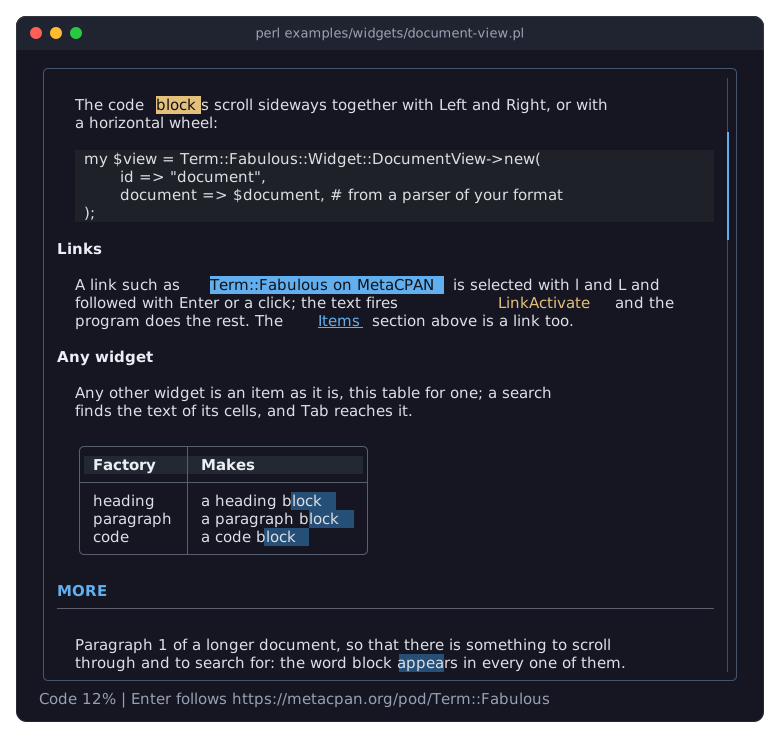
The program is examples/widgets/document-view.pl.
DESCRIPTION
A document view is the main pane of a document reader. It shows a Term::Fabulous::Document, a list of items, each a widget, as a parser made them: headings, paragraphs, list items and code, but also tables, pictures, forms or anything else. The view lets the user read it: it scrolls with the keyboard, the mouse wheel and the scrollbar, selects and follows the links of every text, searches the text of every item, and lets Tab reach the interactive widgets inside.
The view does not know the format the document was made from. Pod::Fabulous uses it to show POD; worked examples for showing documents, following links, searching, building a table of contents and putting any widget into a document are in Term::Fabulous::Cookbook::Documents and Term::Fabulous::Cookbook::DocumentTechniques; the manual introduces documents in "Documents" in Term::Fabulous::Manual::Layout.
The view is a Term::Fabulous::Widget::VirtualList: it attaches only the items near the visible area. A document with thousands of items (perlfunc has about 2000) therefore scrolls as fast as a short one, and every frame stays within Clay's limits on elements and words (see "LIMITATIONS" in Term::Fabulous). The view composes Clay::UI::Role::Interaction::Focusable, so it takes the keyboard focus, and Clay::UI::Role::Interaction::HasFocusOrder, so it decides where Tab goes inside it (see "FOCUS").
A border of the view's own (bordered => 1) is drawn over its content, as the border of every scroll container is: a row scrolled half under it shows its background in the border cells. A bordered Box around the view avoids that; examples/widgets/document-view.pl gives the view a border of its own anyway, to stay short.
How items are shown
Each item is shown in a slot: a box of the view's width that gives the item
the blank rows above it, its
gapoption (none above the first item); do not give the view's layout achild_gap, which would add rows between all items;its indent: the view's "indent" plus the item's
indentoption, or only the latter for aflushitem, such as a heading;a vertical bar on its left for each block quote it is in (its
quoteoption), drawn in thequotestyle of the document's look and followed by one column of space. The blank rows above a quoted item lie inside its bars, so the bars of the items of one quote join up.
See "Item options" in Term::Fabulous::Document. The item itself is shown as it is; the slot is its parent while the view shows the document, which is why a document is shown by one view at a time. The styles of the texts the factories of the document make are palette tokens, so a theme switch restyles every item without the view doing anything; the view recolors only its quote bars.
Before an item was laid out, the view needs its height to size the scrollbar: it asks the item ("estimated_rows" in Term::Fabulous::Widget, which a box composes from its children) unless the item's rows option says it. Once Clay has laid the item out, its real height replaces the estimate.
Marks
Two kinds of highlighting, the marks, are drawn over the items' own styles without rebuilding any widget:
The selected link is the link that
Enterfollows: one link of one Term::Fabulous::Widget::Text anywhere in the document. The view keeps one selection for the whole document and shows it through that text's select_link.The search matches are the occurrences of the text of the last "search" in the texts of every widget that does Term::Fabulous::Role::Searchable: every Text, every code block, and the cells of a table on any page, the pages of a Tabs and the bodies of accordion items, shown or not. They are drawn in the
matchstyle, as highlights that leave the texts' own styles alone; the current match is drawn in thematch_currentstyle instead. next_match and previous_match move it.
A text whose content changes after the search (a table row updated, say) makes the search run again, from the current match, the next time it steps; a selected link whose text changed is no longer selected.
CONSTRUCTOR
new
my $view = Term::Fabulous::Widget::DocumentView->new( id => 'document', %parameters );Creates a document view. It takes all parameters of Term::Fabulous::Widget::VirtualList except build, estimate and count, which the view derives from its document; passing any of them dies. As for every scroll container, an id is required. Unknown parameters and invalid values die. The additional parameters are:
document-
The Term::Fabulous::Document to show, or
undef(the default) for an empty view. Setting a document that another view shows dies. highlighter-
undef(the default), or a code reference that the code blocks the document's code factory made use to highlight their code, called with the code and the language; see "highlighter" in Term::Fabulous::Widget::CodeBlock. indent-
A non-negative integer, default 2: the columns by which every item that is not
flushis indented.
METHODS
The view has all methods of Term::Fabulous::Widget::VirtualList, plus the following. Unless stated otherwise, the methods that scroll, select or search return 1 when they changed something and 0 when there was nothing to change, so a key binding can tell whether the key had an effect. Left, Right, l, L, Enter, n, N and Escape are bound to these methods; the scrolling keys go through "scroll_by_key" in Term::Fabulous::Scrolling.
document
my $document = $view->document;
$view->document($new_document);
Gets or sets the document. A new document starts at its top, without a search or a selected link, its code not scrolled sideways, and a ViewChange follows its first frame. The items of the old document leave their slots, so another view can show it. Setting a document that another view shows dies.
highlighter
$view->highlighter( sub ( $code, $language ) { ... } );Gets or sets the highlighter, which goes to the code blocks of the document at once, and to a code block added later when the view builds it.
indent
$view->indent(4);Gets or sets the indent; the slots are built again.
document_look
my $style = $view->document_look->style('quote');The Term::Fabulous::Document::Look of the document's look class in the theme the view draws with.
scroll_lines
$view->scroll_lines(3);     # down
$view->scroll_lines(-1);    # up
scroll_pages
$view->scroll_pages(1);Scroll by rows, or by pages of the rows the view shows less one, as Term::Fabulous::Scrolling does.
scroll_to_top, scroll_to_bottom
Show the first or the last item. Return 1 whenever the document has items, even when the view is there already, and 0 for an empty document.
show_item
my $index = $document->find_section('SEE ALSO');
$view->show_item($index) if defined $index;
Scrolls the item with that index to the top of the view, in the next frame. Returns the view. An index outside the document dies.
top_item
my $index = $view->top_item; # or undefThe index of the item at the top of the view, or undef before the first frame and for an empty document.
scroll_code
$view->scroll_code(8); # shows the code 8 columns further rightScrolls every code block sideways by that many columns, together, as far as the widest code block in view allows. Code blocks out of view move along, so that they match when they come back.
code_offset
my $columns = $view->code_offset;How far the code blocks are scrolled sideways.
select_next_link, select_previous_link
Select the link after (before) the selected one, from the texts of the items in tree order. Without a selected link in view, the first link at or after the top item in view (the last link at or before the bottom item) is selected, scrolling to it when it lies outside the view. The selection stops at the first and the last link of the document. The line of the link is scrolled into view. A link in content a widget builds later (a table cell on another page) becomes selectable once it is built.
selected_link
my $target = $view->selected_link; # or undefThe target of the selected link, as the text holds it.
follow_link
Fires LinkActivate for the selected link. Returns 0 when no link is selected.
search
my $count = $view->search('needle');Marks every occurrence of the text and makes the first one at or below the top of the view the current match, scrolled into view: its line, inside a text, a code block, or a table cell on another page, which the table turns to (see "reveal_text" in Term::Fabulous::Role::Searchable). A query without capital letters ignores case (see "find_text" in Term::Fabulous::Document). An empty query ends the search. Returns the number of matches.
next_match, previous_match
Make the next (previous) match the current one, around from the last to the first, and scroll it into view.
query, match_count, current_match
The text searched for (or undef), the number of matches, and the number of the current match from 1 (or undef).
clear_marks
Ends the search and drops the selected link. Returns 0 when there was neither.
view_state
my $state = $view->view_state;What the view shows, as the hash of the fields of Term::Fabulous::Event::ViewChange: top and bottom (the items in view), section and section_title (from the document's sections), percent, link, query, match and matches.
get_entry_focus, get_next_focus, get_previous_focus
The methods of Clay::UI::Role::Interaction::HasFocusOrder; see "FOCUS".
build, estimate, count
Without an argument, the methods of Term::Fabulous::Widget::VirtualList return the values the view installed: its builder, its estimate, and the number of items. Setting any of them dies.
KEYS
While the view or a widget inside it has the focus, the view handles these keys, when the focused widget does not use them first. The scrolling keys are the less set of "scroll_by_key" in Term::Fabulous::Scrolling, which "Scroll any scroll box like a pager (Term::Fabulous::Scrolling)" in Term::Fabulous::Cookbook::DocumentTechniques gives to a plain ScrollBox:
Down, j            scroll down one row
Up, k              scroll up one row
PageDown, Space    scroll down one page
PageUp, b          scroll up one page
Home, g            go to the top of the document
End, G             go to the end of the document
Left, Right        scroll the code blocks eight columns sideways
l, L               select the next or the previous link
Enter              follow the selected link
n, N               go to the next or the previous search match
Escape             end the search and drop the selected link
The view consumes every key in this table, even when the key has nothing to do: at the end of the document, Down still belongs to the view and does not reach the enclosing widgets. There are two exceptions. When no link is selected, the view does not consume Enter; the same applies to Escape when there is neither a search nor a selected link. While a widget inside an item has the focus, Enter always goes on, and Escape gives the focus back to the view instead, keeping the marks. All other keys bubble up as well (see "KEYBOARD" in Term::Fabulous::Manual::Events).
FOCUS
The view is a Tab stop. Tab and Shift+Tab that come from outside land on the view itself, whichever widget of the document is near. From the view, Tab goes to the first interactive widget of the items at or below the top of the view, then from widget to widget in the order of the document, and past the last one out of the view; Shift+Tab goes back, to the view from the first widget, and out of the view from the view. An interactive widget is a focusable widget other than a text: buttons, text fields, tables. A widget whose item is far from the view and not built yet is brought into view and gets the focus once its item is there, a frame or two later; a focused widget is kept in view as in every ScrollBox. Inside a dialog, the order stays in the dialog (see "focus_after" in Clay::UI::Interaction).
Texts with links are no Tab stops inside the view: l and L select the links of all texts. When a text takes the focus anyway, from a click on it, the view takes the focus back, and the text's first link, or the link clicked, becomes the selected link. "Put any widget into a document (a table and a picture)" in Term::Fabulous::Cookbook::DocumentTechniques shows Tab reaching a table inside a document.
MOUSE
The mouse wheel and the scrollbar scroll the view vertically, as in every Term::Fabulous::Widget::ScrollBox. The horizontal wheel (or tilting the wheel sideways) scrolls the code blocks three columns per notch, as "scroll_code" does, while the pointer is over a code block. Texts and blank rows do not receive mouse events, so a notch over them goes to the widget the view is in, not to the view; only when the view is the root widget of the UI does a notch anywhere over it scroll the code. Once the code cannot scroll further in that direction, the event is passed on to the enclosing widgets. A click on a text or on a code block focuses the view; a click on an interactive widget focuses that widget.
A left click on a link selects the link and follows it: the text fires LinkActivate with the link's target as its link. As the event bubbles up through the view, the view makes the clicked link its selected link and lets the event continue, so listeners on the view and on the widgets around it receive it. The link under the mouse pointer is drawn as hovered.
EVENTS
LinkActivate(Term::Fabulous::Event::LinkActivate)-
Fired when the user presses
Enterwhile a link is selected, when the program calls "follow_link", and when the user clicks a link. The text of the link fires it, and it bubbles up through the view; when that text is not in the view at the moment (its item scrolled out of the window), the view fires it itself.$event->linkis the target of the link, exactly as the document holds it. "Follow links: jump to sections, open other pages, go back (LinkActivate)" in Term::Fabulous::Cookbook::Documents builds a help browser on it. ViewChange(Term::Fabulous::Event::ViewChange)-
Fired on the view after a frame in which the summary that "view_state" returns differs from the one the view reported last, for example because the user scrolled, selected a link or searched. It also fires after the first frame of a new document. A link target that is a reference counts as changed only when it is a different reference. "Search a document and show the reader's position (search, ViewChange)" in Term::Fabulous::Cookbook::Documents shows a status line fed by it.
- The events of Term::Fabulous::Widget::VirtualList
-
OnScrollandMouse, as well asOnFocusandOnBlurfrom Clay::UI::Role::Interaction::Focusable.
KDL PROPERTIES
The properties of Term::Fabulous::Widget::VirtualList, plus indent:
use Term::Fabulous::Widget::DocumentView as Document

Document "document" {
	indent 2
}
The document is given in Perl, with "document".
SEE ALSO
Term::Fabulous::Document, Term::Fabulous::Document::Look, Term::Fabulous::Role::Searchable, Term::Fabulous::Event::ViewChange, Term::Fabulous::Cookbook::Documents, Term::Fabulous::Cookbook::DocumentTechniques, Term::Fabulous::Widget::VirtualList, Pod::Fabulous.