NAME
Term::Fabulous::Widget::ScrollBox - A box whose content scrolls
SYNOPSIS
use Clay::XS qw(sizing_grow sizing_fixed CLAY_TOP_TO_BOTTOM);
use Term::Fabulous::Enum::BorderStyle;
use Term::Fabulous::Widget::ScrollBox;
use Term::Fabulous::Widget::Text;

my $log = Term::Fabulous::Widget::ScrollBox->new(
	id               => 'log',                  # required
	layout           => {
		layout_direction => CLAY_TOP_TO_BOTTOM,
		sizing           => { width => sizing_grow(), height => sizing_fixed(10) },
		padding          => { left => 1, right => 1 },
	},
	background_color => [ 30, 35, 50, 255 ],
	bordered         => 1,
	border_color     => [ 120, 160, 220, 255 ],
	border_style     => Term::Fabulous::Enum::BorderStyle->Round,
);
$log->add_child( Term::Fabulous::Widget::Text->new( text => "Line $_", text_color => [ 220, 220, 220, 255 ] ) )
	foreach 1 .. 100;

$log->on( OnScroll => sub ($event) {
	printf STDERR "scrolled by %d rows\n", $event->delta_y;
	return;
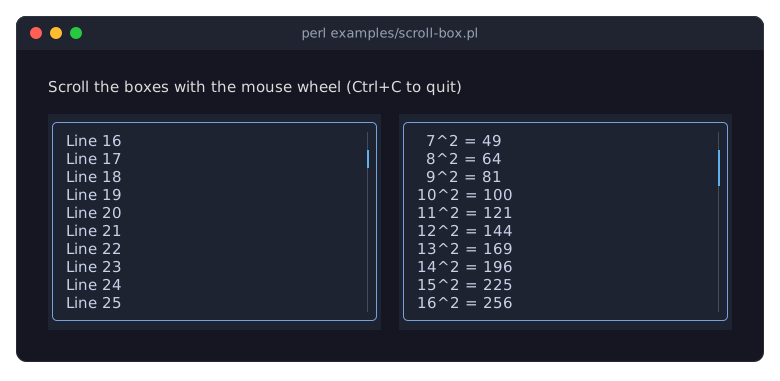
} );
DESCRIPTION
A ScrollBox is a Term::Fabulous::Widget::Box for content that is larger than the box: everything that does not fit is clipped, and the user scrolls through it with the mouse wheel or with the scrollbars. Typical uses are logs, long lists and help texts. Every child is laid out in every frame, visible or not; for thousands of children, the paragraphs of a long document say, use a Term::Fabulous::Widget::VirtualList, which attaches only the ones near the viewport.
A vertical scrollbar (a Term::Fabulous::Widget::Scrollbar) takes the last column inside the border, and a horizontal one the last row when the box scrolls sideways; the content keeps clear of them. While the content fits, a scrollbar is empty but keeps its column or row, so the content does not jump when it starts to scroll. A click on a scrollbar scrolls so that the thumb is centered under the pointer, and dragging with the left button keeps doing so. scrollbar => 0 removes the scrollbars and gives their cells back to the content.
The size of a ScrollBox comes from its own sizing, not from its content, so give it a fixed, grow or percent height (and width, when it scrolls sideways). With the default fit sizing the box grows with its content instead of scrolling it.
Under Term::Fabulous, every notch of the mouse wheel scrolls the ScrollBox under the pointer by three rows, and every notch of a horizontal wheel (or a sideways tilt of the wheel) by three columns, unless a widget under the pointer used the notch to scroll itself (see "CAVEATS"). The scroll position is clamped, so the content cannot be scrolled past its first or last row. The position is applied when the next frame is drawn. Keys do not scroll a ScrollBox by themselves; a key handler can, with "scroll_by_key" in Term::Fabulous::Scrolling.
The content is clipped to the whole box, border included: scrolled content passes under the border, which is drawn on top of it. Content scrolled out of view receives no mouse events.
CONSTRUCTOR
new
my $box = Term::Fabulous::Widget::ScrollBox->new( id => 'log', %parameters );Unknown parameters die. A ScrollBox takes every parameter of Term::Fabulous::Widget::Box (see "new" in Term::Fabulous::Widget) plus:
id-
A non-empty string, unique in the widget tree. Required: without it the constructor dies, because the scroll position is stored by id from one frame to the next.
vertical-
A boolean, stored as 1 or 0. Default: 1. Whether the content scrolls up and down.
horizontal-
A boolean, stored as 1 or 0. Default: 0. Whether the content scrolls sideways, with a horizontal wheel or with
child_offset. child_offset-
undefor a hash reference{ x => $columns, y => $rows }. Default:undef, which lets the mouse wheel control the position. A hash takes over: the content is drawn shifted by that many cells, and the wheel no longer moves it. Negative values move the content up and left, so{ x => 0, y => -3 }shows the content from its fourth row on. Set it back toundefto give control back to the wheel. The wheel keeps moving the hidden scroll position whilechild_offsetis set, so the content may jump when you set it back toundef. scrollbar-
A boolean, stored as 1 or 0. Default: 1. Whether the scrollbars are shown: a vertical one while
verticalis true, a horizontal one whilehorizontalis true. Each takes one column or row inside the border from the content. follow_end-
A boolean, stored as 1 or 0. Default: 0. Whether the box keeps the end of its content in view, as a log or the output of a command wants: while the box shows the last row, content added at the bottom scrolls into view after the frame that lays it out (see "follow_end").
track_color-
The color of the scrollbars' track, anything Term::Fabulous::Color understands. Default: the theme's
scrollbar.track, a dark grey,[ 70, 76, 90, 255 ], in the dark theme. thumb_color-
The color of the scrollbars' thumb. Default: the theme's
scrollbar.thumb, a light blue,[ 97, 175, 239, 255 ], in the dark theme.
METHODS
To scroll a ScrollBox from your program, by rows, by pages, to either end or with the keys of a pager, use Term::Fabulous::Scrolling; to keep a log at its newest line, turn on "follow_end". The recipe Scroll a ScrollBox from code shows both in a complete program. Underneath, these use the methods scroll_state and scroll_to of the application object.
A ScrollBox has all methods of Term::Fabulous::Widget plus these accessors (from Clay::UI::Role::Layout::HasScroll):
vertical
$box->vertical(0);Accessor. Without an argument it returns the stored value, 1 or 0; with an argument it stores any true or false value as 1 or 0 and returns it. References die. The change shows in the next frame.
horizontal
$box->horizontal(1);Accessor for horizontal, used like "vertical".
child_offset
$box->child_offset( { x => 0, y => -20 } );    # show from row 21 on
$box->child_offset(undef);                      # back to the wheel
Accessor. Without an argument it returns the hash reference, or undef while the wheel controls the position; with an argument it sets it and returns the new value. An invalid value dies like the constructor parameter. The change shows in the next frame.
scrollbar
$box->scrollbar(0);Accessor for scrollbar, used like "vertical". Switching the scrollbars off gives their cells back to the content in the next frame.
content_padding
my $padding = $box->content_padding;The padding of the layout plus a column at the right for a vertical scrollbar and a row at the bottom for a horizontal one, as the box lays out its content (see "content_padding" in Term::Fabulous::Widget), so that its estimated_rows counts the scrollbars.
follow_end
$box->follow_end(1);Accessor for follow_end. While it is on, the box checks after every frame (see "each_frame" in Term::Fabulous::Widget) whether it still follows the end of its content:
a box that shows the last row follows;
a box that follows and was not scrolled up since the last frame, but no longer shows the last row (the content grew, or the box got shorter), is scrolled to the end ("scroll_to_start, scroll_to_end" in Term::Fabulous::Scrolling). The new content shows one frame after the frame that laid it out, which is due at once;
a box that was scrolled up (with the wheel, a key, the scrollbar or
scroll_to) stops following, and follows again once it shows the last row: the user reads older content undisturbed, and scrolling back to the end resumes.
Turning it on starts following at once. Writing returns the new value.
The recipes "Scroll a ScrollBox from code (keep a log at the newest line)" in Term::Fabulous::Cookbook::LiveData and "Show the output of a running command" in Term::Fabulous::Cookbook::LiveData use it.
track_color, thumb_color
$box->track_color('#464c5a');
$box->thumb_color( [ 97, 175, 239, 255 ] );
Accessors for the scrollbar colors. Without an argument they return the color as [r, g, b, a]; with one they set it on both scrollbars and return it. An invalid color dies and leaves the old one; so does undef: $box->reset_look('thumb_color') returns the color of both scrollbars to the theme (see "reset_look" in Term::Fabulous::Widget).
children
my @lines = @{ $box->children };The children you added, as on any Term::Fabulous::Widget::Box. The scrollbars are not among them, and clear_children and the other removal methods leave them alone.
reveal
$box->reveal($row);                     # the smallest move that shows it
$box->reveal( $section, align => 'top' );    # its first row at the top
$box->reveal( $row, frames => 8 );      # wait longer for its layout
Scrolls a widget inside the box (at any depth) into view, vertically. With align => 'nearest' (the default) the box moves the smallest way that shows the widget's whole box, or its top rows when it is taller than the viewport; with align => 'top' the widget's first row goes to the top of the box, as far as the content allows (see "reveal_rows" in Term::Fabulous::Scrolling).
When the last frame laid the widget out, the box scrolls at once. Otherwise (the widget was only just added, its parent builds it in the next frame, or the box is not in a UI yet) it tries again after each frame until one has laid the widget out, for at most frames frames (default 2), and gives up after that or when the widget is freed (see "each_frame" in Term::Fabulous::Widget; a box in a plain Clay::UI does not retry). A new reveal replaces one still waiting. Dies for anything but a widget inside the box, another align, a frames that is not a positive integer, or another option. Returns the box.
FOCUS
A widget inside the box that gets the keyboard focus is scrolled into view: with Tab, a click, or "set_focused_widget" in Clay::UI::Interaction, the box reveals it with the smallest move (see "reveal"), a text with links (Term::Fabulous::Widget::Text) like any widget. A widget that gets the focus before it was ever laid out, right after it was added, is revealed after the frame that lays it out. Only the vertical direction is scrolled.
The box itself has no keys and takes no focus; see Term::Fabulous::Scrolling for scrolling it from a key handler.
EVENTS
OnScroll(Clay::UI::Events::OnScroll)-
Fired on the ScrollBox in every frame in which its scroll position changed.
$event->delta_yis how far the content moved, in rows: negative when the content was scrolled down (the content moved up), by the user or from code, and positive when it was scrolled up; this is the opposite sign of a change of scroll_offset.$event->delta_xis the same for columns. Whilechild_offsetis set,OnScrollstill reports the movement of the hidden scroll position that the wheel moves, even though the content does not move. Mouse(Term::Fabulous::Event::Mouse)-
Fired for wheel notches and clicks over the box, like on any Box (see "MOUSE" in Term::Fabulous::Manual::Events). The scrolling does not depend on what your listeners return: a listener that stops the event from bubbling does not stop the scrolling. Only a call to "use_wheel" in Term::Fabulous::Event::Mouse keeps a notch from scrolling the box.
KDL PROPERTIES
The properties of "KDL PROPERTIES" in Term::Fabulous::Widget::Box, plus horizontal, vertical, scrollbar and follow_end (#true or #false) and the colors track_color and thumb_color. The node needs an id argument:
ScrollBox "log" {
	layout direction=down
	sizing width=grow height="fixed(10)"
	vertical #true
	thumb_color "#61afef"
}
child_offset cannot be set from KDL.
CAVEATS
A widget inside a ScrollBox that uses the mouse wheel itself (a Term::Fabulous::Widget::TextArea, a Term::Fabulous::Widget::Slider, an open Term::Fabulous::Widget::Dropdown list) takes the notches over it while it can move, and the ScrollBox stays put; once the widget is at its end, the notches scroll the ScrollBox again. So a long form scrolls past a text area as soon as the text area shows its last rows.
The scrollbars are drawn over the box, inside its border, after the content. Content that scrolls sideways passes under the vertical scrollbar's column; while there is nothing to scroll down, that column is empty and shows the content beneath.
SEE ALSO
"SCROLLING" in Term::Fabulous::Manual::Events, "Scroll a ScrollBox from code (keep a log at the newest line)" in Term::Fabulous::Cookbook::LiveData, Term::Fabulous::Scrolling, "Scroll any scroll box like a pager (Term::Fabulous::Scrolling)" in Term::Fabulous::Cookbook::DocumentTechniques, Term::Fabulous::Widget::VirtualList for thousands of children, Term::Fabulous::Widget::Scrollbar, Term::Fabulous::Widget::Box, Clay::UI::Role::Layout::HasScroll, the example program examples/scroll-box.pl.