NAME
Term::Fabulous::Cookbook::DocumentTechniques - Recipes: a table of contents, syntax highlighting, styles, pager keys and any widget in a document
DESCRIPTION
This page is part of Term::Fabulous::Cookbook. Previous page: Term::Fabulous::Cookbook::Documents. Next page: Term::Fabulous::Cookbook::Output.
This page continues Term::Fabulous::Cookbook::Documents, which builds documents in Perl and from Markdown and shows how a Term::Fabulous::Widget::DocumentView follows links and searches text; start there if you have not shown a document yet. The recipes here go further: a table of contents beside the document, syntax highlighting of its code blocks, styles and mark kinds of your own, the keys of a pager for any scroll box, and a table and a picture as items of a document, with a search that reaches into the table.
Two recipes load their documents with the Markdown reader of "Turn Markdown into a document (Markdent)" in Term::Fabulous::Cookbook::Documents, examples/cookbook/lib/My/Markdown.pm, and show the files in examples/cookbook/documents; the highlighting and styles recipes build their documents in Perl, and the pager recipe shows a plain text file in a ScrollBox. The classes behind the recipes: Term::Fabulous::Document (items and sections), Term::Fabulous::Document::Look (the styles of the mark kinds), Term::Fabulous::Widget::CodeBlock (code with a highlighter), Term::Fabulous::Scrolling (the keys of a pager) and Term::Fabulous::Role::Searchable (what a search reaches). The manual introduces documents in "Documents" in Term::Fabulous::Manual::Layout.
The recipes on this page:
"Show a table of contents beside the document (sections, KDL)"
"Highlight the syntax of code blocks (highlighter, CodeBlock)"
"Scroll any scroll box like a pager (Term::Fabulous::Scrolling)"
Show a table of contents beside the document (sections, KDL)
Goal: a list of all headings beside the document. A click on a heading, or Enter on a selected one, shows its section; a mark in front of a heading follows the reader through the document. The layout comes from a KDL description.
This program is shipped as examples/cookbook/document-contents.pl.
use v5.32;
use warnings;
use feature 'signatures';
no warnings 'experimental::signatures';

use FindBin;
use lib "$FindBin::Bin/lib";    # where My/Markdown.pm lives

use My::Markdown;
use Term::Fabulous;
use Term::Fabulous::Layout;
use Term::Fabulous::Text::Markup qw(escape_markup);

my $root = Term::Fabulous::Layout->new( string => <<'KDL' )->build;
use Term::Fabulous::Widget::Box as Box
use Term::Fabulous::Widget::Text as Text
use Term::Fabulous::Widget::DocumentView as DocumentView

Box "root" {
	sizing width=grow height=grow

	Box "contents-pane" {
		sizing width="fixed(34)" height=grow
		padding left=1 right=1
		border style=Round
		bordered #true
		Text "contents" { text ""; }
	}

	// The view is framed by a box around it rather than by a border of its
	// own, as its documentation advises.
	Box "page-pane" {
		sizing width=grow height=grow
		border style=Round
		bordered #true
		DocumentView "manual" {
			sizing width=grow height=grow
			padding left=1 right=1
			indent 2
		}
	}
}
KDL

my $view     = $root->find_by_id('manual');
my $contents = $root->find_by_id('contents');
my $document = My::Markdown->parse_file("$FindBin::Bin/documents/snapback.md");
$view->document($document);

# One line per heading, indented by its level, each a link to its
# section number; a mark in front of the section the reader is in.
sub show_contents ($current) {
	my @sections = $document->sections;
	my @lines    = map {
		my $section = $sections[$_];
		my $title   = escape_markup( $section->{title} );
		my $mark    = defined $current && $current == $_ ? '[bold]>[/] ' : '  ';
		$mark . '  ' x ( $section->{level} - 1 ) . "[link=$_]$title\[/link]";
	} 0 .. $#sections;
	$contents->markup( join "\n", @lines );
	return;
}
show_contents(undef);

# The view reports the section at its top after every frame that shows
# something new; the contents follow it.
my $shown_section = -1;
$view->on(
	ViewChange => sub ($event) {
		my $section = $event->section // -1;
		return if $section == $shown_section;
		$shown_section = $section;
		show_contents( $event->section );
		return;
	}
);

# A click on a heading, or Enter on the selected one, shows its section.
$contents->on(
	LinkActivate => sub ($event) {
		$view->show_item( $document->item_of_section( $event->link ) );
		return;
	}
);

my $ui = Term::Fabulous->new( root => $root, width => 100, height => 26 );
$ui->interaction->set_focused_widget($view);
$ui->run;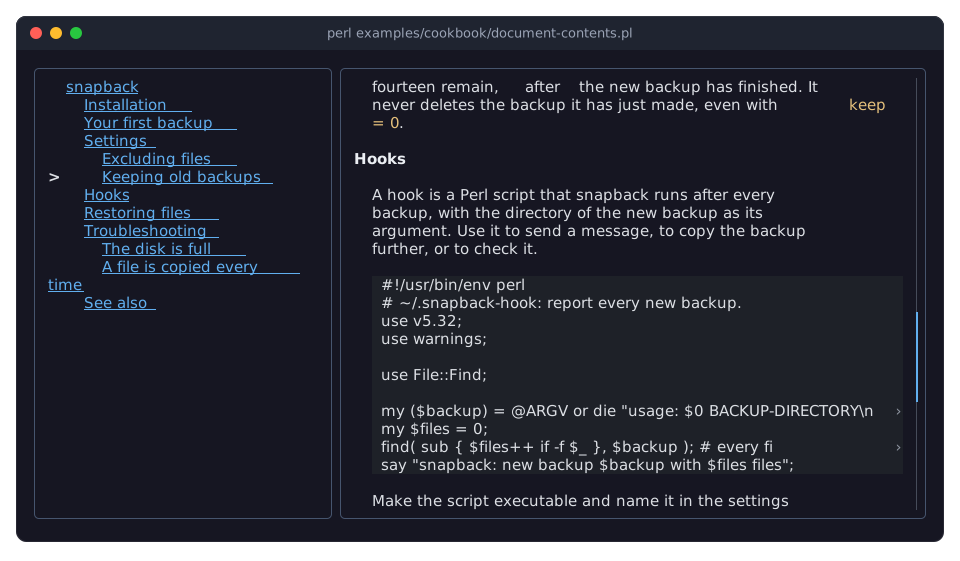
The picture shows the program after three presses of PageDown.
A document numbers its sections from 0 in the order they appear: each starts at a heading and runs to the next one. sections returns them as hashes with the
itema section starts at, itsleveland itstitle, and item_of_section gives the item of one of them by its number.$event->sectionofViewChangeis the number of the section the item at the top of the view belongs to, orundefabove the first heading. The program rebuilds the contents only when this number changes, not after every scrolled row.The contents are a Text written in markup: every heading is a link whose target is its section number. A heading that contains
[is escaped as\[, so that the markup parser does not read it as a tag ("escape_markup" in Term::Fabulous::Text::Markup does the same for any text). A Text with links is a Tab stop:Tabmoves the focus between the contents and the document, and in the contentsLeft,RightandEnterselect and follow the links. Setting the markup keeps the focus.The KDL layout uses the view like any other widget, after
use Term::Fabulous::Widget::DocumentView as DocumentView. KDL can setindentand the properties of every scroll container; the document itself comes from the program, through document. See "KDL PROPERTIES" in Term::Fabulous::Widget::DocumentView.The view is framed by a box around it, not by a border of its own. In a scroll container, content scrolled under the container's own border shows its background in the border cells; a frame outside avoids that.
Highlight the syntax of code blocks (highlighter, CodeBlock)
Goal: color the code blocks of a document by language, and scroll long lines sideways.
This program is shipped as examples/cookbook/code-highlighting.pl.
use v5.32;
use warnings;
use feature 'signatures';
no warnings 'experimental::signatures';

use Clay::XS qw(sizing_grow);
use Term::Fabulous;
use Term::Fabulous::Document;
use Term::Fabulous::Widget::DocumentView;

# The styles of the kinds of token, and for each language a pattern
# that finds its tokens, one named group per kind.
my %STYLE_OF = (
	comment  => 'italic #7f848e',
	string   => '#98c379',
	variable => '#e06c75',
	keyword  => 'bold #c678dd',
	command  => 'bold #61afef',
	option   => '#d19a66',
	key      => '#e06c75',
);
my %TOKENS_OF = (
	perl => qr{
		  (?<comment>  \#.* )
		| (?<string>   "(?:[^"\\]|\\.)*" | '(?:[^'\\]|\\.)*' )
		| (?<variable> [\$\@%][\w:]+ )
		| (?<keyword>  \b(?:my|our|use|sub|return|if|unless|foreach|while|or|and|die)\b )
	}x,
	shell => qr{
		  (?<comment> \#.* )
		| (?<option>  (?<=\s) --?[\w-]+ )
		| (?<command> ^\w[\w-]* )
	}xm,
	ini => qr{
		  (?<comment> ^\s*\#.* )
		| (?<key>     ^\w+ (?=\s*=) )
	}xm,
);

# A highlighter gets the code of a block and its language, and returns
# spans [ start, end, style ] of character offsets into the code.
sub highlight ( $code, $language ) {
	my $tokens = $TOKENS_OF{ $language // '' } or return [];
	my @spans;
	while ( $code =~ /$tokens/g ) {
		my ($kind) = keys %+;
		push @spans, [ $-[0], $+[0], $STYLE_OF{$kind} ];
	}
	return \@spans;
}

# The code items name the language a highlighter gets. A parser takes
# the language from the source, such as the word after ``` in Markdown.
my $document = Term::Fabulous::Document->new;
$document->heading( 2, 'Highlighted code' );
$document->paragraph('Each code block names its language, and the highlighter colors its tokens. Left and Right scroll all code blocks sideways together.');
$document->code( <<'PERL' =~ s/\n\z//r, language => 'perl' );
#!/usr/bin/env perl
use v5.32;
use warnings;

my ($backup) = @ARGV or die "usage: $0 BACKUP-DIRECTORY\n";
say "snapback: new backup in $backup";    # a long comment that runs past the right edge of the view, to scroll to
PERL
$document->code( <<'SHELL' =~ s/\n\z//r, language => 'shell' );
snapback --dry-run ~/Documents /mnt/backup    # lists, copies nothing
SHELL
$document->code( <<'INI' =~ s/\n\z//r, language => 'ini' );
# ~/.snapback
target = /mnt/backup
keep   = 14
INI

my $view = Term::Fabulous::Widget::DocumentView->new(
	id          => 'code',
	document    => $document,
	highlighter => \&highlight,
	layout      => { sizing => { width => sizing_grow(), height => sizing_grow() }, padding => { left => 1, right => 1 } },
);

my $ui = Term::Fabulous->new( root => $view, width => 80, height => 24 );
$ui->interaction->set_focused_widget($view);
$ui->run;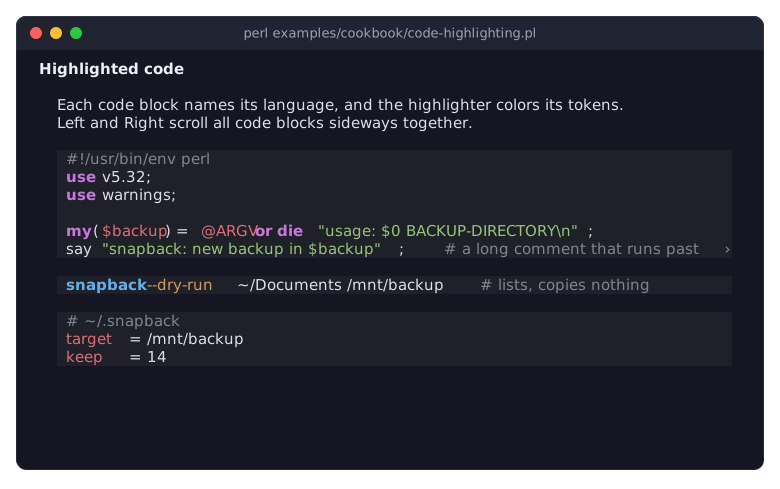
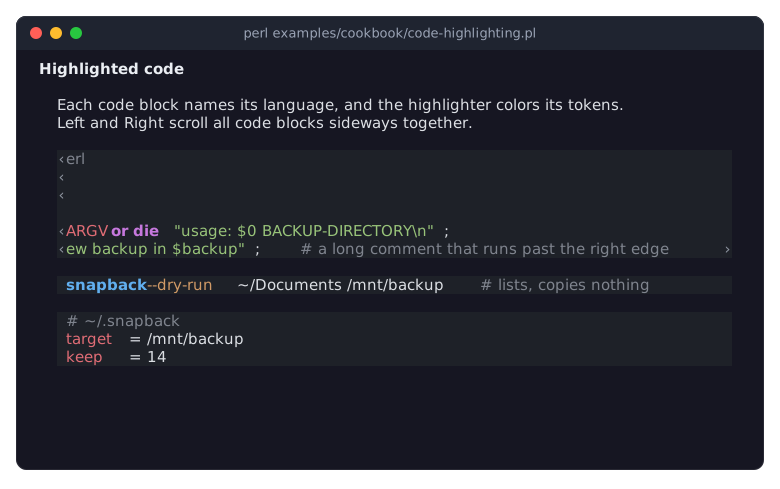
After two presses of Right, the code blocks are scrolled sideways together:
A highlighter is a code reference that receives the code of a block and its language, and returns an array reference of spans
[ $start, $end, $style ]: character offsets into the code and a style string such as'bold #c678dd'(see "Style strings" in Term::Fabulous::Text::Style). Give it to the view with thehighlighterparameter; the view passes it to every code block the document's code factory made.Each code block calls the highlighter once and keeps the result until its code, its language or the highlighter changes, so scrolling does not run it again. For a language this highlighter does not know, or no language, it returns
[], and the block stays plain.This highlighter finds the tokens of a language with one regular expression with a named group per kind of token. Because the pattern scans the code from left to right, a string that starts before a
#is matched first and swallows it, so a#inside a string stays part of the string. For real syntax highlighting, a highlighter can use a proper tokenizer, such as PPI for Perl.The language comes from the
languagethe code factory was given. The program gives it directly; a parser takes it from the source, asMy::Markdowndoes with the word after the opening fence of a code block (```perl).Code never wraps. A line wider than the view ends at its edge with a clip mark.
LeftandRightscroll all code blocks of the view sideways together, 8 columns at a time; a horizontal mouse wheel over a code block scrolls them too, 3 columns per notch. Each block moves only as far as its own longest line needs, so short blocks stay where they are. scroll_code does it from code.The style strings here are fixed colors, which suit a dark theme. The highlighter is called with no access to the theme; to follow the theme, look the colors up with
$ui->theme->token('success')(see "Tokens" in Term::Fabulous::Theme) and set a new highlighter after every theme switch.Term::Fabulous::Widget::CodeBlock is also a widget on its own, for code outside a document. It takes the same
highlighter, plus spans of the program's own.
Change the styles of a document and add mark kinds (Look)
Goal: change how some kinds of text look, and add mark kinds of your own: keys shown like keycaps, underlined text, and a highlighter pen. F2 switches between the dark and the light theme, and the styles follow.
This program is shipped as examples/cookbook/document-styles.pl.
use v5.32;
use warnings;
use feature 'signatures';
no warnings 'experimental::signatures';

use Object::Pad 0.825;

use Clay::UI::Enum::Result;
use Clay::XS qw(sizing_grow);
use Term::Fabulous;
use Term::Fabulous::Document;
use Term::Fabulous::Document::Look;
use Term::Fabulous::Widget::DocumentView;

# The styles of the document: two built-in kinds changed, three kinds
# added. Colors are palette tokens of the theme, so the styles follow a
# theme switch.
class My::ManualLook :isa(Term::Fabulous::Document::Look) {

	method recipes :common () {
		return (
			$class->SUPER::recipes,
			heading1  => { words => 'bold', color => 'success' },
			code      => { color => 'accent' },
			key       => { words => 'bold', color => 'text_bright', background => 'surface_raised' },
			underline => { words => 'underline' },
			highlight => { color => 'text_inverse', background => 'warning' },
		);
	}
}

# A piece is a plain string or [ KIND => 'text' ].
sub marked (@pieces) {
	my ( $text, @marks ) = ('');
	foreach my $piece (@pieces) {
		my ( $kind, $words ) = ref $piece ? @$piece : ( undef, $piece );
		my $start = length $text;
		$text .= $words;
		push @marks, [ $start, length $text, $kind ] if defined $kind;
	}
	return { text => $text, marks => \@marks };
}

# The document names the look its factories style the marks with; a
# kind the look does not know dies at once.
my $document = Term::Fabulous::Document->new( look => 'My::ManualLook' );
$document->heading( 1, 'Keys of the editor' );
$document->paragraph(
	marked( 'Press ', [ key => 'Ctrl+S' ], ' to save the file and ', [ key => 'Ctrl+Q' ], ' to quit. Unsaved changes are ', [ underline => 'never' ], ' lost: the editor asks first.' ) );
$document->paragraph(
	marked( 'The settings live in ', [ code => '~/.editorrc' ], '. ', [ highlight => 'New in version 3:' ], ' ', [ key => 'F2' ], ' switches between the dark and the light theme.' ) );
$document->heading( 2, 'Moving around' );
$document->paragraph( marked( [ key => 'Home' ], ' and ', [ key => 'End' ], ' go to the start and the end of a line, ', [ bold => 'Ctrl' ], ' with them to the start and the end of the file.' ) );

my $view = Term::Fabulous::Widget::DocumentView->new(
	id       => 'manual',
	document => $document,
	indent   => 4,
	layout   => { sizing => { width => sizing_grow(), height => sizing_grow() }, padding => { left => 1, right => 1, top => 1 } },
);

my $ui = Term::Fabulous->new( root => $view, width => 80, height => 24 );

$view->on(
	KeyPress => sub ($event) {
		return Clay::UI::Enum::Result->CONTINUE unless ( $event->key_name // '' ) eq 'F2';
		$ui->theme( $ui->theme->name eq 'dark' ? 'light' : 'dark' );
		return;
	}
);

$ui->interaction->set_focused_widget($view);
$ui->run;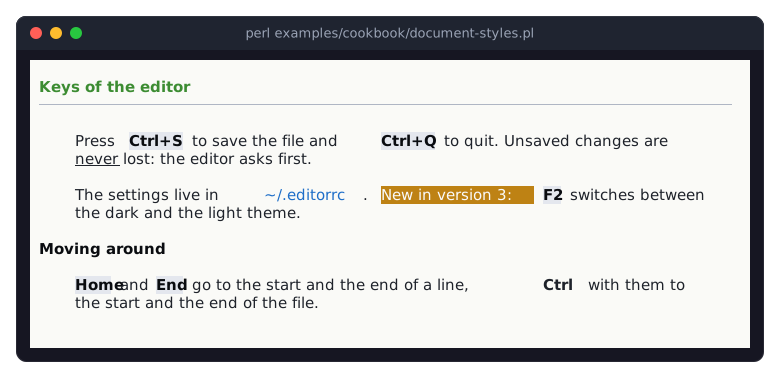
The picture shows the light theme, after F2.
A look maps each kind to a style. Its class method recipes returns a list of
kind => recipepairs. A recipe has up to three entries:words, style words such as'bold italic';color, the text color; andbackground. Colors are palette tokens of the theme, such asaccentorsurface_raised(see "Tokens" in Term::Fabulous::Theme), not fixed colors, so a theme switch restyles the document.The subclass returns the recipes of its parent followed by its own. Later pairs win, so
heading1andcodereplace the built-in recipes, andkey,underlineandhighlightare new. Keep the parent's recipes: the factories use kinds such asheading2andmarker, and the viewmatchandquote.The document names its look:
Term::Fabulous::Document->new( look => 'My::ManualLook' ). Its factories style every mark through it, so they accept the new kinds; a mark of a kind the look does not know dies at once, with the kinds it knows. The code blocks of the document paint with itscode_blockstyle too.markedis the helper of "Show a document built in Perl (Document, factories, marks)" in Term::Fabulous::Cookbook::Documents, without links. The styles it names are looked up in the theme when a text paints, so a theme switch with$ui->theme(...)needs no further call.indent => 4indents the paragraphs by four columns instead of two. Headings are never indented.
Scroll any scroll box like a pager (Term::Fabulous::Scrolling)
Goal: page through a text in a plain ScrollBox with the keys of a pager, show how far down the reader is, and bring a given line into view. The document view scrolls with the same functions, and so can any program.
This program is shipped as examples/cookbook/pager-keys.pl. It shows the file named on its command line, or the source of the Markdown reader of "Turn Markdown into a document (Markdent)" in Term::Fabulous::Cookbook::Documents.
use v5.32;
use warnings;
use feature 'signatures';
no warnings 'experimental::signatures';

use FindBin;

use Clay::UI::Enum::Result;
use Clay::XS qw(sizing_grow CLAY_TOP_TO_BOTTOM CLAY_TEXT_WRAP_NONE);
use List::Util qw(first);
use Text::Tabs qw(expand);
use Term::Fabulous;
use Term::Fabulous::Scrolling qw(inner_rows reveal_rows scroll_by_key scroll_offset scrolled_percent);
use Term::Fabulous::Widget::Box;
use Term::Fabulous::Widget::ScrollBox;
use Term::Fabulous::Widget::Text;

use constant {
	PLAIN  => [ 200, 210, 230, 255 ],
	MARKED => [ 229, 192, 123, 255 ],
};

my $file = shift // "$FindBin::Bin/lib/My/Markdown.pm";
open my $handle, '<:encoding(UTF-8)', $file or die "Cannot read $file: $!\n";
chomp( my @lines = <$handle> );
close $handle;
$Text::Tabs::tabstop = 4;
@lines               = expand(@lines);

my $text = Term::Fabulous::Widget::ScrollBox->new(
	id     => 'text',
	layout => { layout_direction => CLAY_TOP_TO_BOTTOM, sizing => { width => sizing_grow(), height => sizing_grow() }, padding => { left => 1, right => 1 } },
);
my @rows = map { Term::Fabulous::Widget::Text->new( text => length $_ ? $_ : "\x{A0}", wrap_mode => CLAY_TEXT_WRAP_NONE, text_color => PLAIN ) } @lines;
$text->add_child(@rows);

my $status = Term::Fabulous::Widget::Text->new( text => '', wrap_mode => CLAY_TEXT_WRAP_NONE, text_color => [ 150, 160, 180, 255 ] );
my $root   = Term::Fabulous::Widget::Box->new( layout => { layout_direction => CLAY_TOP_TO_BOTTOM, sizing => { width => sizing_grow(), height => sizing_grow() } } );
$root->add_child( $text, $status );

my $ui = Term::Fabulous->new( root => $root, width => 80, height => 24 );

# n marks the next line that starts a sub or a method and scrolls it
# into view. reveal_rows takes screen rows: line $index of the text is
# on the row where the content starts, plus $index, less how far the
# text is scrolled (scroll_offset, in rows).
my $marked = -1;

sub mark_next_definition () {
	my $next = first { $lines[$_] =~ /\A\s*(?:sub|method)\b/ } $marked + 1 .. $#lines;
	return 0 unless defined $next;
	$rows[$marked]->text_color(PLAIN) if $marked >= 0;
	$rows[$next]->text_color(MARKED);
	$marked = $next;
	my ($top) = inner_rows( $ui, $text ) or return 1;    # nothing is laid out before the first frame
	my $row = $top + $next - sprintf( '%.0f', scroll_offset( $ui, $text ) );
	reveal_rows( $ui, $text, $row, $row + 1 );
	return 1;
}

my $note = 'j k Space b g G scroll, n marks the next definition';

sub show_status () {
	my $percent = scrolled_percent( $ui, $text ) // 0;
	$status->text( sprintf ' %s  %d%%  %s', $file =~ s{.*/}{}r, $percent, $note );
	return;
}
show_status();

# The keys of less (j k Space b g G, the arrows, PageUp, PageDown, Home
# and End) scroll; scroll_by_key returns undef for any other key, else 1
# when it moved the text and 0 when it could not, at the start or the
# end. n marks the next definition.
$root->on(
	KeyPress => sub ($event) {
		my $name  = $event->main_key_name // return Clay::UI::Enum::Result->CONTINUE;
		my $moved = $name eq 'n' ? mark_next_definition() : scroll_by_key( $ui, $text, $name, keys => 'less' );
		return Clay::UI::Enum::Result->CONTINUE unless defined $moved;
		$note = $moved ? '' : 'Nothing more in that direction.';
		show_status();
		return;
	}
);

# A frame that moved the text reports it; the percentage is that of
# the frame just laid out.
$text->on(
	OnScroll => sub ($event) {
		show_status();
		return;
	}
);

$ui->run;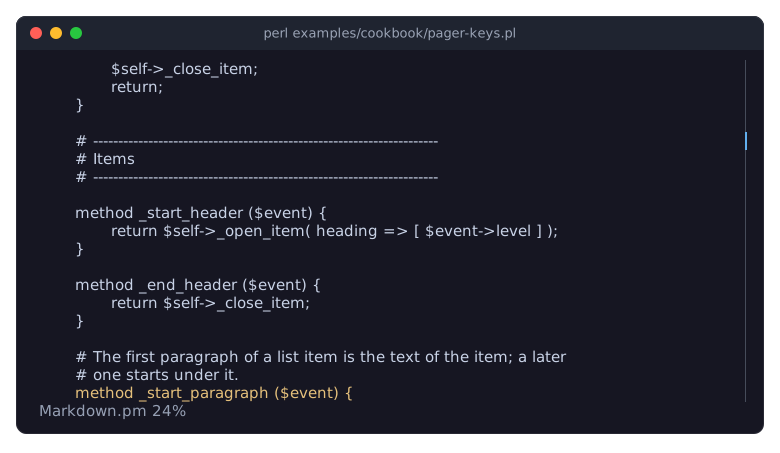
The picture shows the program after six presses of n.
Term::Fabulous::Scrolling moves the content of any scroll container (a ScrollBox, a VirtualList, a document view) by rows, by pages and to its ends. Each function takes the UI and the container, so it works on any container of any program.
scroll_by_key knows the keys of pagers:
keys => 'less'are those ofless(j,k,Space,b,g,G,Up,Down,PageUp,PageDown,HomeandEnd), the ones a document view uses too;keys => 'pager'onlyPageUp,PageDown,Ctrl+HomeandCtrl+End, for a box whose arrow keys belong to the widgets inside it. It returnsundeffor a key it does not know, and the handler lets that key go on;nthe handler checks first, itself.A page is the number of rows the container shows inside its border and padding, less one: the last row of a page stays in view as the first row of the next, as in
less.Every function that scrolls returns 1 when it moved the content and 0 when it could not, at the top or the end; so does
scroll_by_keyfor its keys. The program shows a note when a key did nothing. Before the first frame nothing is laid out: the functions that scroll return 0, andscrolled_percentreturnsundef, which the program shows as 0%.scrolled_percent returns how far the content is scrolled, from 0 to 100. The program reads it in the handler of
OnScroll, which the ScrollBox fires in every frame that moved its content.reveal_rows scrolls a range of screen rows, as the last frame laid them out, into view with the smallest movement. A widget that is out of view has no position on the screen (
$ui->bounding_boxreturnsundeffor it), so the program computes the row itself: here every line is one row, so line$indexis on the first row of the content plus$index, less scroll_offset, the number of rows the content is scrolled down. inner_rows gives that first row, inside the box's border and padding. Two lines of the program keep every line one row high: an empty line becomes a no-break space, so that its Text is not empty, and tabs are expanded with Text::Tabs, so that no line is wider than it looks.
Put any widget into a document (a table and a picture)
Goal: show examples/cookbook/documents/news.md, the release notes of snapback, with the logo of the program as a picture and the releases as a table with pages, and find a word in a cell of the table that is on another page.
The Markdown reader of "Turn Markdown into a document (Markdent)" in Term::Fabulous::Cookbook::Documents does the work: a paragraph that holds nothing but a picture becomes a box of a Term::Fabulous::Widget::Image and its caption, and a table becomes a Term::Fabulous::Widget::Table. Both are added to the document with add, like any widget:
$document->add( $figure, indent => $indent, quote => $quote );The program is shipped as examples/cookbook/document-widgets.pl. It searches for the word named on its command line, and shows the file named after it, or the release notes:
use v5.32;
use warnings;
use feature 'signatures';
no warnings 'experimental::signatures';

use FindBin;
use lib "$FindBin::Bin/lib";    # where My/Markdown.pm lives

use Clay::XS qw(sizing_grow);
use My::Markdown;
use Term::Fabulous;
use Term::Fabulous::Widget::DocumentView;

# A word to search for, if any, and the file to show.
my ( $word, $file ) = @ARGV;
my $document = My::Markdown->parse_file( $file // "$FindBin::Bin/documents/news.md", page_size => 3 );

my $view = Term::Fabulous::Widget::DocumentView->new(
	id       => 'news',
	document => $document,
	layout   => { sizing => { width => sizing_grow(), height => sizing_grow() }, padding => { left => 1, right => 1 } },
);
$view->search($word) if defined $word;

my $ui = Term::Fabulous->new( root => $view, width => 80, height => 24 );
$ui->interaction->set_focused_widget($view);
$ui->run;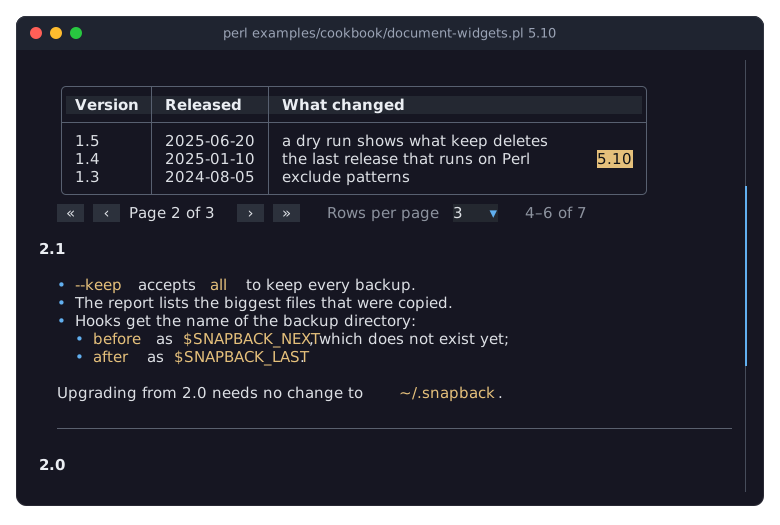
The picture shows the program started with the word 5.10, which only the fifth release mentions: in its table row, on the table's second page, and in its notes below. The first match, in the table, is the current one:
perl examples/cookbook/document-widgets.pl 5.10Any widget that has no parent yet can be an item. The view puts it into a slot of its own, a box that gives it its indent, the blank rows above it and its quote bars, and shows it as it is. A table keeps its own keys, its pages and its scrollbar.
The view searches through Term::Fabulous::Role::Searchable: every widget of an item that does the role answers for its own texts. A Term::Fabulous::Widget::Text, the caption here, answers for its text. A table answers from its rows, not from the cells it shows, so a search finds the rows on every page and under collapsed rows; when the current match is in a row on another page, the table turns to that page and the view scrolls to the row. The match is a highlight over the cell, which leaves the cell's own styles alone.
The view needs to know how tall an item is before it lays it out, to size its scrollbar. It asks the widget: a text counts its wrapped lines, a box adds up its children, a table its header and the rows of its page, and a picture the rows its layout gives it (see "estimated_rows" in Term::Fabulous::Widget). A widget that cannot tell counts one row, and the scrollbar jumps a little when its item comes into view; the
rowsoption of add tells the view the right number instead.The table is focusable, so Tab reaches it: from the view, Tab goes to the first interactive widget at or below the top of the view, the next Tab to the next one, and past the last one out of the view;
Escapegives the focus back to the view. A widget far below is brought into view first. See "FOCUS" in Term::Fabulous::Widget::DocumentView.Texts with links anywhere in an item, the caption of a picture for instance, take part in
landLlike the paragraphs of the document.
Some directions from here:
A form in a document. A box with a text field and a button is an item like any other; Tab reaches its fields in the order of the document.
Footnotes. Leave a marker such as
[1]in the text, as a link whose target names the note, and add the notes as paragraphs at the end of the document.Widgets of your own. A widget that shows text it builds only later, as a table does with its pages, does Term::Fabulous::Role::Searchable to be found by a search; a container that holds searchable widgets out of view (pages, a collapsed body) does Term::Fabulous::Role::SearchContainer; one whose height is known before the layout overrides estimated_content_rows.
Pod::Fabulous is a complete reader built the same way, for POD.
SEE ALSO
This page is part of Term::Fabulous::Cookbook. Previous page: Term::Fabulous::Cookbook::Documents. Next page: Term::Fabulous::Cookbook::Output.
Term::Fabulous::Cookbook::Documents (the first recipes for documents), Term::Fabulous::Widget::DocumentView, Term::Fabulous::Document, Term::Fabulous::Document::Look, Term::Fabulous::Widget::CodeBlock, Term::Fabulous::Scrolling, Term::Fabulous::Role::Searchable, "Documents" in Term::Fabulous::Manual::Layout.