NAME
Term::Fabulous::Cookbook::Documents - Recipes: build documents in Perl and from Markdown, follow links, search
DESCRIPTION
This page is part of Term::Fabulous::Cookbook. Previous page: Term::Fabulous::Cookbook::Canvases. Next page: Term::Fabulous::Cookbook::DocumentTechniques.
This page shows how to display long, structured text: a manual, a help file, release notes, anything with headings, paragraphs, lists and code, and tables, pictures or any other widget between them. The widget for this is Term::Fabulous::Widget::DocumentView. It shows a Term::Fabulous::Document, scrolls it with the keyboard and the mouse, lets the user select and follow links, searches the text, and lets Tab reach the buttons and fields inside.
The view does not read any file format itself. A reader turns the source into a document, and the view shows the document. This separation is what makes the view reusable: the same widget shows POD in Pod::Fabulous and the Markdown pages of the recipes below.
A document is a list of items, and every item is a widget:
The common items come from the factories of the document: headings, paragraphs, list items, the terms of a definition list, code and rules. A factory takes plain text and marks, ranges of the text with the kind of formatting they had (
bold,code,link, ...), and makes a Term::Fabulous::Widget::Text or a Term::Fabulous::Widget::CodeBlock whose spans are in the styles a look gives those kinds.Any other widget is added as it is: a table, a picture, a box with buttons. The view searches its text and selects its links like those of every other item.
Every item has a few options for the view: the blank rows above it, its indent and the quotes it is in. Headings start the sections that a table of contents lists and links lead to.
The first two recipes build documents, by hand and from Markdown with Markdent. The next two use that reader to show what the view does with a document: follow its links and search its text. The next page, Term::Fabulous::Cookbook::DocumentTechniques, continues with a table of contents, syntax highlighting, styles of your own, the keys of a pager for any scroll box, and a table and a picture inside a document.
The recipes on this page:
"Show a document built in Perl (Document, factories, marks)"
"Follow links: jump to sections, open other pages, go back (LinkActivate)"
"Search a document and show the reader's position (search, ViewChange)"
The recipes of Term::Fabulous::Cookbook::DocumentTechniques:
Show a table of contents beside the document (sections, KDL)
Highlight the syntax of code blocks (highlighter, CodeBlock)
Scroll any scroll box like a pager (Term::Fabulous::Scrolling)
Show a document built in Perl (Document, factories, marks)
Goal: build a document with the factories of Term::Fabulous::Document and the built-in mark kinds, and show it in a document view. This is what every reader does in the end, so it is worth seeing once without a reader in between.
This program is shipped as examples/cookbook/document-basics.pl.
use v5.32;
use warnings;
use feature 'signatures';
no warnings 'experimental::signatures';

use Clay::XS qw(sizing_grow);
use Term::Fabulous;
use Term::Fabulous::Document;
use Term::Fabulous::Widget::DocumentView;

# Joins pieces of text into a text and the marks over it, as the
# factories take them. A piece is a plain string, [ KIND => 'text' ] for
# a styled piece, or [ link => 'text', TARGET ] for a link.
sub marked (@pieces) {
	my ( $text, @marks ) = ('');
	foreach my $piece (@pieces) {
		if ( !ref $piece ) {
			$text .= $piece;
			next;
		}
		my ( $kind, $words, $target ) = @$piece;
		my $start = length $text;
		$text .= $words;
		push @marks, [ $start, length $text, $kind, $kind eq 'link' ? ($target) : () ];
	}
	return { text => $text, marks => \@marks };
}

my $document = Term::Fabulous::Document->new;

$document->heading( 1, 'snapback' );
$document->paragraph(
	marked(
		[ bold   => 'snapback' ],    ' copies the files of a directory to a backup disk, but ',
		[ italic => 'only' ],        ' those that changed since the last run. It reads its settings from ',
		[ file   => '~/.snapback' ], '. The old option ', [ strike => '--all' ], ' is gone.',
	)
);

$document->heading( 2, 'Usage' );
$document->code( "snapback ~/Documents /mnt/backup\nsnapback --dry-run ~/Photos /mnt/backup", language => 'shell' );

$document->heading( 2, 'Options' );
$document->term('--dry-run');
$document->paragraph( 'Lists the files it would copy, and copies nothing.', indent => 4 );
$document->term('--keep N');
$document->paragraph( marked( 'Keeps the last ', [ code => 'N' ], ' backups and deletes older ones.' ), indent => 4 );

$document->heading( 2, 'Before the first run' );
$document->list_item( '-',  'Connect the backup disk.' );
$document->list_item( '-',  'Check that it has enough free space:',                                        position => 2 );
$document->list_item( '1.', marked( 'Run ', [ code => 'df -h /mnt/backup' ], '.' ),                        indent   => 2 );
$document->list_item( '2.', 'Compare it with the size of the directory.',                                  indent   => 2, position => 2 );
$document->list_item( '-',  marked( 'Try a dry run first (see ', [ link => 'Options', 'Options' ], ').' ), position => 3 );

$document->heading( 3, 'From the mailing list' );
$document->paragraph( 'Ada wrote:',                                                                             quote => 1 );
$document->paragraph( 'Restore a file now and then. A backup that was never restored is a hope, not a backup.', quote => 2 );
$document->paragraph( marked( 'More at ', [ link => 'snapback.example.org', 'https://snapback.example.org' ], '.' ) );

my $view = Term::Fabulous::Widget::DocumentView->new(
	id       => 'manual',
	document => $document,
	layout   => { sizing => { width => sizing_grow(), height => sizing_grow() }, padding => { left => 1, right => 1, top => 1 } },
);

my $ui = Term::Fabulous->new( root => $view, width => 80, height => 24 );
$ui->interaction->set_focused_widget($view);
$ui->run;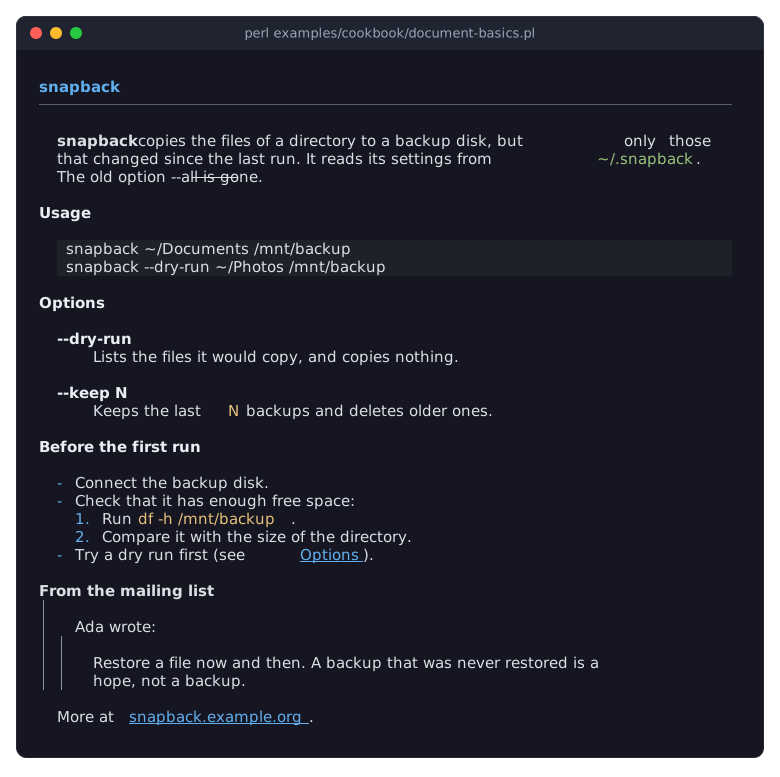
A factory takes a text as a plain string, or as a hash of the plain
textand itsmarks. A mark points into the text by character offsets,[ $start, $end, $kind ]: the offset of the first character the mark covers, the offset after the last one, and the kind of formatting. Counting offsets by hand is error-prone, so the program builds every text from pieces with the smallmarkedfunction: it appends the pieces and records the offsets of each styled piece as it goes. A reader does the same while it removes the formatting from its source. A factory also takes{ markup => '...' }, the markup of Term::Fabulous::Text::Markup. Its tags are style strings and palette tokens, not the kinds of the look:[bold]and[link=faq.md]work,[code]and[file]die.The built-in look has the mark kinds
bold,italic,strike,codeandfilefor formatting inside a paragraph, and[ $start, $end, link =$target ]> is a link. Its target can be any defined value: a URL, the name of a section, a hash reference or an object of your program. The view hands it back unchanged when the user follows the link (see "Follow links: jump to sections, open other pages, go back (LinkActivate)"). "KINDS" in Term::Fabulous::Document::Look lists every kind and its colors; a kind the look does not know dies.A heading has a level from 1 to 6. Level 1 gets a rule under it. Headings are never indented, and each starts a section.
code keeps its lines and never wraps. Its optional
languageis passed to a syntax highlighter, if the view has one (see "Highlight the syntax of code blocks (highlighter, CodeBlock)" in Term::Fabulous::Cookbook::DocumentTechniques).A term starts an entry of a definition list, and the paragraph after it is its definition. Indent the definition (here by 4 columns) and the factory puts it directly under the term, without a blank row.
Every list item is an item of its own: the marker, a bullet or a number, in a column of its own, and the text, whose lines all start after the marker.
marker_width, the columns from the start of the marker to the start of the text, is one more than the marker by default; give all items of one list the same width, so that their texts line up.positioncounts the items of a list from 1; an item with position 1 starts a new list, with a blank row above it, unless it starts a list nested in the item before it.A nested list is a list whose items are indented: the
indentof a nested item is theindentof its parent item plus the parent'smarker_width, so that the nested marker sits exactly under the parent's text. The first nested item follows its parent directly.quoteis the number of block quotes an item is inside. The view draws a bar on the left for each level.The view needs an
id, like every scroll container. The view itself indents every item except headings by 2 columns (theindentparameter), and puts the blank rows the items ask for between them on its own; do not give its layout achild_gap.The program focuses the view, so the keys of "KEYS" in Term::Fabulous::Widget::DocumentView work at once: the arrow keys,
PageUpandPageDown,HomeandEnd, orj,k,Space,b,gandGas inless. The mouse wheel and the scrollbar scroll as well.
Turn Markdown into a document (Markdent)
Goal: show a Markdown file. Reading Markdown is a solved problem: Markdent from CPAN parses it, with the fenced code blocks and the struck-through text of the GitHub dialect and the tables of the Theory dialect. What remains is the part that belongs to this page: turning what Markdent found into the items of a document. The next two recipes use this reader to load their documents, and so do the table of contents and the table-and-picture recipes of Term::Fabulous::Cookbook::DocumentTechniques.
The reader is shipped as examples/cookbook/lib/My/Markdown.pm. It needs Markdent, which you may have to install first (cpanm Markdent).
package My::Markdown;

# Reads Markdown with Markdent and turns it into a Term::Fabulous::Document,
# for the recipes of Term::Fabulous::Cookbook::Documents and
# Term::Fabulous::Cookbook::DocumentTechniques. Headings,
# paragraphs, list items, block quotes, code blocks and horizontal rules
# become items through the factories of the document, with bold, italic
# and struck-through text, code and links as marks. A table becomes a
# Term::Fabulous::Widget::Table, a picture alone in its paragraph a
# Term::Fabulous::Widget::Image with its caption. HTML is left out.

use v5.32;
use warnings;
use feature 'signatures';
no warnings 'experimental::signatures';

use Object::Pad 0.825;

class My::Markdown {
	use Clay::XS qw(sizing_fixed sizing_grow CLAY_TOP_TO_BOTTOM);
	use File::Basename qw(dirname);
	use File::Spec;
	use HTML::Entities qw(decode_entities);
	use List::Util qw(min);
	use Markdent::Handler::CaptureEvents;
	use Markdent::Parser;
	use Term::Fabulous::Document;
	use Term::Fabulous::Widget::Box;
	use Term::Fabulous::Widget::Image;
	use Term::Fabulous::Widget::Table;
	use Term::Fabulous::Widget::Text;

	use constant {
		BULLET_WIDTH   => 2,    # a bullet and a space
		NUMBER_WIDTH   => 4,    # room for "99. "
		PICTURE_ROWS   => 8,    # the height of a picture in the document
		PICTURE_COLUMN => 32,    # and its width
	};

	# The mark kind of each piece of inline markup Markdent reports
	my %MARK_KIND = ( strong => 'bold', emphasis => 'italic', strikethrough => 'strike', code => 'code', link => 'link' );

	field $document  :param;    # the document the items go into
	field $directory :param = '.';    # where the pictures of the source are
	field $page_size :param = 0;    # the rows of a table page; 0 shows a table whole

	field $open;    # the item whose text is being collected: { factory, arguments, options, text, marks, unfinished, pictures }
	field @lists;    # the lists the reader is in, outermost first: { numbered, position, indent, marker_width }
	field $quote = 0;    # how many block quotes the reader is in
	field $table;    # the table being read: { header => [ cells ], rows => [ [ cells ] ], in_header }
	field $tables = 0;    # the tables read so far, for their ids

	# A document from Markdown text. page_size gives the tables pages of
	# that many rows.
	method parse :common ( $source, %options ) {
		my $events = Markdent::Handler::CaptureEvents->new;
		Markdent::Parser->new( dialects => [ 'GitHub', 'Theory' ], handler => $events )->parse( markdown => $source );
		my $document = Term::Fabulous::Document->new( defined $options{source} ? ( source => $options{source} ) : () );
		$class->new( document => $document, map { exists $options{$_} ? ( $_ => $options{$_} ) : () } qw(directory page_size) )->_read( $events->captured_events->events );
		return $document;
	}

	method parse_file :common ( $path, %options ) {
		open my $handle, '<:encoding(UTF-8)', $path or die "My::Markdown: cannot read $path: $!\n";
		my $source = do { local $/; <$handle> };
		close $handle;
		return $class->parse( $source, %options, source => $path, directory => dirname($path) );
	}

	# Every event becomes a call of the method named after it; the inline
	# markup that becomes a mark is handled in one place. Events without
	# a method (HTML, the document itself) are skipped.
	method _read (@events) {
		foreach my $event (@events) {
			my $kind = $MARK_KIND{ lc $event->name };
			if ( defined $kind && $event->is_start ) {
				$self->_start_mark( $kind, $kind eq 'link' ? $event->uri : undef );
			}
			elsif ( defined $kind ) {
				$self->_end_mark;
			}
			elsif ( my $method = $self->can( '_' . $event->event_name ) ) {
				$self->$method($event);
			}
		}
		$self->_close_item;
		return;
	}

	# ---------------------------------------------------------------------
	# Items
	# ---------------------------------------------------------------------

	method _start_header ($event) {
		return $self->_open_item( heading => [ $event->level ] );
	}

	method _end_header ($event) {
		return $self->_close_item;
	}

	# The first paragraph of a list item is the text of the item; a later
	# one starts under it.
	method _start_paragraph ($event) {
		return if $open && $open->{factory} eq 'list_item';
		return $self->_open_item( paragraph => [] );
	}

	method _end_paragraph ($event) {
		return $self->_close_item;
	}

	method _start_unordered_list ($event) {
		return $self->_enter_list(0);
	}

	method _start_ordered_list ($event) {
		return $self->_enter_list(1);
	}

	method _end_unordered_list ($event) {
		return $self->_leave_list;
	}

	method _end_ordered_list ($event) {
		return $self->_leave_list;
	}

	method _start_list_item ($event) {
		my $list     = $lists[-1];
		my $position = ++$list->{position};
		return $self->_open_item(
			list_item    => [ $list->{numbered} ? "$position." : "\x{2022}" ],
			marker_width => $list->{marker_width},
			position     => $position,
			indent       => $list->{indent},
		);
	}

	# The text of a tight item has no paragraph around it, so the item is
	# still open here.
	method _end_list_item ($event) {
		return $self->_close_item;
	}

	method _start_blockquote ($event) {
		$self->_close_item;
		$quote++;
		return;
	}

	method _end_blockquote ($event) {
		$self->_close_item;
		$quote--;
		return;
	}

	# A fenced code block, with the word after the opening fence as its
	# language
	method _code_block ($event) {
		my $language = $event->language;
		$self->_close_item;
		$document->code( $event->code =~ s/\n\z//r, $self->_placed, defined $language && length $language ? ( language => $language ) : () );
		return;
	}

	# An indented code block
	method _preformatted ($event) {
		$self->_close_item;
		$document->code( $event->text =~ s/\n\z//r, $self->_placed );
		return;
	}

	method _horizontal_rule ($event) {
		$self->_close_item;
		$document->rule( $self->_placed );
		return;
	}

	# A nested list starts where the text of its parent item starts.
	method _enter_list ($numbered) {
		$self->_close_item;
		push @lists, { numbered => $numbered, position => 0, indent => $self->_indent, marker_width => $numbered ? NUMBER_WIDTH : BULLET_WIDTH };
		return;
	}

	method _leave_list () {
		$self->_close_item;
		pop @lists;
		return;
	}

	# Where the text after the marker of the current list item starts: the
	# indent of everything inside the item that is not its first paragraph.
	method _indent () {
		return 0 unless @lists;
		return $lists[-1]{indent} + $lists[-1]{marker_width};
	}

	# The options of an item at the place the reader is: its indent and
	# the quotes it is in.
	method _placed () {
		return ( indent => $self->_indent, quote => $quote );
	}

	# Starts collecting the text and marks of an item that a factory of the
	# document makes once its text is complete.
	method _open_item ( $factory, $arguments, %options ) {
		$self->_close_item;
		$open = { factory => $factory, arguments => $arguments, options => { $self->_placed, %options }, text => '', marks => [], unfinished => [], pictures => [] };
		return;
	}

	# Blank space at the end of the text is dropped, and a mark that
	# covered it ends with the text. A paragraph that holds nothing but a
	# picture becomes the picture.
	method _close_item () {
		return unless $open;
		my $item = $open;
		$open = undef;
		my $text     = $item->{text} =~ s/\s+\z//r;
		my @pictures = @{ $item->{pictures} };
		return $self->_add_picture( $pictures[0], $item->{options} ) if $item->{factory} eq 'paragraph' && @pictures == 1 && $text eq $pictures[0]{alt};
		my @marks   = map { [ $_->{start}, min( $_->{end}, length $text ), $_->{kind}, defined $_->{link} ? ( $_->{link} ) : () ] } $item->{marks}->@*;
		my $factory = $item->{factory};
		$document->$factory( @{ $item->{arguments} }, { text => $text, marks => [ grep { $_->[0] < $_->[1] } @marks ] }, %{ $item->{options} } );
		return;
	}

	# A picture with its caption under it, the alternative text, which a
	# search finds.
	method _add_picture ( $picture, $options ) {
		my $figure = Term::Fabulous::Widget::Box->new( layout => { layout_direction => CLAY_TOP_TO_BOTTOM, sizing => { width => sizing_grow() } } );
		$figure->add_child(
			Term::Fabulous::Widget::Image->new(
				file => File::Spec->rel2abs( $picture->{uri}, $directory ), fit => 'contain', layout => { sizing => { width => sizing_fixed(PICTURE_COLUMN), height => sizing_fixed(PICTURE_ROWS) } }
			),
			Term::Fabulous::Widget::Text->new( text => $picture->{alt}, italic => 1 ),
		);
		$document->add( $figure, %$options );
		return;
	}

	# ---------------------------------------------------------------------
	# Tables: the cells are collected as plain text, and the table becomes
	# a Table widget with a column per cell of its header
	# ---------------------------------------------------------------------

	method _start_table ($event) {
		$self->_close_item;
		$table = { header => [], rows => [] };
		return;
	}

	method _start_table_header ($event) {
		$table->{in_header} = 1;
		return;
	}

	method _end_table_header ($event) {
		$table->{in_header} = 0;
		return;
	}

	method _start_table_row ($event) {
		push @{ $table->{ $table->{in_header} ? 'header' : 'rows' } }, [];
		return;
	}

	method _start_table_cell ($event) {
		$open = { factory => 'cell', text => '', marks => [], unfinished => [], pictures => [] };
		return;
	}

	method _end_table_cell ($event) {
		my $row = $table->{ $table->{in_header} ? 'header' : 'rows' }[-1];
		push @$row, $open->{text} =~ s/\A\s+|\s+\z//gr;
		$open = undef;
		return;
	}

	method _end_table ($event) {
		my $header  = @{ $table->{header} } ? $table->{header}[0] : shift @{ $table->{rows} };
		my @rows    = @{ $table->{rows} };
		my @columns = map { { key => "c$_", title => $header->[$_] } } 0 .. $#$header;
		my $id      = 0;
		my @data    = map {
			my $row = $_;
			+{ id => ++$id, map { ( "c$_" => $row->[$_] // '' ) } 0 .. $#$header }
		} @rows;
		$document->add(
			Term::Fabulous::Widget::Table->new(
				id        => 'table-' . ++$tables,
				columns   => \@columns,
				rows      => \@data,
				page_size => $page_size,
				layout    => { sizing => { width => sizing_grow() } },
			),
			$self->_placed
		);
		$table = undef;
		return;
	}

	# ---------------------------------------------------------------------
	# Text and marks
	# ---------------------------------------------------------------------

	# The text of an item arrives in pieces, between the events of its
	# marks. A line end is a space: the view wraps the text itself.
	method _text ($event) {
		return $self->_append( $event->text =~ s/\s*\n\s*/ /gr );
	}

	method _line_break ($event) {
		return $self->_append(' ');
	}

	method _html_entity ($event) {
		return $self->_append( decode_entities( '&' . $event->entity . ';' ) );
	}

	# A bare address is a link whose text is the address.
	method _auto_link ($event) {
		$self->_start_mark( link => $event->uri );
		$self->_append( $event->uri );
		return $self->_end_mark;
	}

	# A picture in the text shows its alternative text, in italics; alone
	# in a paragraph it becomes the picture itself (see _close_item).
	method _image ($event) {
		my $item = $self->_item_being_collected;
		push @{ $item->{pictures} }, { alt => $event->alt_text, uri => $event->uri };
		$self->_start_mark('italic');
		$self->_append( $event->alt_text );
		return $self->_end_mark;
	}

	method _append ($text) {
		my $item = $self->_item_being_collected;
		$text =~ s/\A\s+// unless length $item->{text};
		$item->{text} .= $text;
		return;
	}

	# A mark starts at the end of the text collected so far and ends at the
	# end of the text when its end event comes.
	method _start_mark ( $kind, $link = undef ) {
		my $item = $self->_item_being_collected;
		push $item->{unfinished}->@*, { kind => $kind, start => length $item->{text}, link => $link };
		return;
	}

	method _end_mark () {
		my $item = $self->_item_being_collected;
		my $mark = pop $item->{unfinished}->@*;
		push $item->{marks}->@*, { %$mark, end => length $item->{text} };
		return;
	}

	method _item_being_collected () {
		return $open // die "My::Markdown: text outside of an item\n";
	}
}

1;
The program, shipped as examples/cookbook/document-from-markup.pl, shows the file named on its command line, or the manual examples/cookbook/documents/snapback.md:
use v5.32;
use warnings;
use feature 'signatures';
no warnings 'experimental::signatures';

use FindBin;
use lib "$FindBin::Bin/lib";    # where My/Markdown.pm lives

use Clay::XS qw(sizing_grow);
use My::Markdown;
use Term::Fabulous;
use Term::Fabulous::Widget::DocumentView;

my $file     = shift // "$FindBin::Bin/documents/snapback.md";
my $document = My::Markdown->parse_file($file);

my $view = Term::Fabulous::Widget::DocumentView->new(
	id       => 'manual',
	document => $document,
	layout   => { sizing => { width => sizing_grow(), height => sizing_grow() }, padding => { left => 1, right => 1 } },
);

my $ui = Term::Fabulous->new( root => $view, width => 80, height => 24 );
$ui->interaction->set_focused_widget($view);
$ui->run;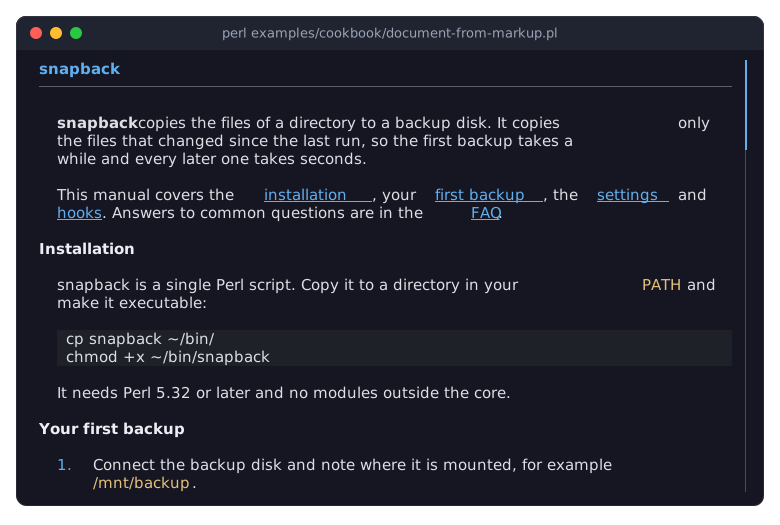
Markdent reports what it finds as a stream of events:
start_header,text,start_strong,end_strong,end_headerand so on, in the order of the source, and hands them to a handler. The reader uses the ready-made Markdent::Handler::CaptureEvents, which records the events, and walks them afterwards; that keeps it a plain Object::Pad class. A handler of your own is a Moose class that does Markdent::Role::Handler; it receives the same events one by one.An event that starts a paragraph or a heading opens an item: the reader remembers the factory that will make it and its options, and collects the text that follows. The event that ends the item, or the start of the next one, closes it; only then does the factory make the item. Which event becomes which item:
start_header: a heading with the level of the event.start_paragraph: a paragraph, unless it is the first paragraph of a list item. That one is the text of the item. A paragraph that holds nothing but a picture becomes the picture (see "Put any widget into a document (a table and a picture)" in Term::Fabulous::Cookbook::DocumentTechniques).start_list_item: a list item. Its marker,marker_widthandpositioncome from the list it is in.code_block(a fenced block) andpreformatted(an indented one): code; a fenced block passes the word after its opening fence as thelanguage.horizontal_rule: a rule.start_tabletoend_table: a Term::Fabulous::Widget::Table, added with add (see "Put any widget into a document (a table and a picture)" in Term::Fabulous::Cookbook::DocumentTechniques).start_blockquoteandend_blockquote: no item of their own, but every item between them gets aquoteone higher.
The text of an item arrives in pieces, between the events of its marks, and the reader appends them. A line end inside a paragraph becomes a space; the view wraps the text itself. The start event of a piece of inline markup records a mark whose start is the length of the text collected so far, and the end event completes it with the length at that time as its end. The offsets of a mark are therefore always offsets into the text without markup, which is what the factories expect. Which event becomes which mark:
strongisbold,emphasisisitalic,strikethroughisstrike,codeiscode, andlinkis a link whose target is the address between the parentheses, exactly as written.auto_link, an address in angle brackets, is a link whose text is the address. A picture in the middle of a text shows its alternative text in italics.The reader keeps a stack of the lists it is in. A nested list, which Markdown indents by four spaces, starts where the text of its parent item starts: its
indentis the parent'sindentplus the parent'smarker_width. That is the rule from the first recipe, now computed. A second paragraph of an item and a code block inside one start there too. The blank rows between the items come from the factories.parse_filepasses the file name as the document'ssource, so the program can show it or open relative links from there, and its directory as the place the pictures are in.The reader leaves out HTML: an HTML block disappears, and of an inline tag only the text inside it stays. The reader knows nothing of the screen, and the view knows nothing of Markdown: the same view shows the documents of any reader.
Follow links: jump to sections, open other pages, go back (LinkActivate)
Goal: a small help browser. Links to a section of the same page jump there, links to another file open it, web addresses are reported in the status bar, and Backspace goes back to where the reader was.
This program is shipped as examples/cookbook/document-links.pl. It shows snapback.md and faq.md from examples/cookbook/documents.
use v5.32;
use warnings;
use feature 'signatures';
no warnings 'experimental::signatures';

use FindBin;
use lib "$FindBin::Bin/lib";    # where My/Markdown.pm lives

use Clay::UI::Enum::Result;
use Clay::XS qw(sizing_grow CLAY_TOP_TO_BOTTOM);
use My::Markdown;
use Term::Fabulous;
use Term::Fabulous::Widget::Box;
use Term::Fabulous::Widget::DocumentView;
use Term::Fabulous::Widget::StatusBar;

my $directory = "$FindBin::Bin/documents";
my %document_of;    # the pages read so far, by file name
my @history;    # where Backspace goes back to: [ page, block at the top ]
my $page  = 'snapback.md';
my $where = '';    # the section and the percentage, from the last ViewChange

sub document_of ($name) {
	return $document_of{$name} //= My::Markdown->parse_file("$directory/$name");
}

my $view = Term::Fabulous::Widget::DocumentView->new(
	id       => 'manual',
	document => document_of($page),
	layout   => { sizing => { width => sizing_grow(), height => sizing_grow() }, padding => { left => 1, right => 1 } },
);
my $status = Term::Fabulous::Widget::StatusBar->new(
	message => 'l: next link  Enter: follow  Backspace: back',
	timeout => 4,
	parts   => sub { return ( [ $page, 'accent' ], [ $where, 'dim' ] ) },
);
my $root = Term::Fabulous::Widget::Box->new( layout => { layout_direction => CLAY_TOP_TO_BOTTOM, sizing => { width => sizing_grow(), height => sizing_grow() } } );
$root->add_child( $view, $status );

# Shows a page, at the block of a section when the link names one, and
# remembers where the reader was.
sub open_page ( $name, $section ) {
	unless ( -e "$directory/$name" ) {
		$status->message( "There is no page $name.", 'danger' );
		return;
	}
	my $document = document_of($name);
	my $index    = length $section ? $document->find_section($section) : 0;
	unless ( defined $index ) {
		$status->message( "$name has no section \"$section\".", 'danger' );
		return;
	}
	push @history, [ $page, $view->top_item // 0 ];
	$view->document($document) if $name ne $page;
	$view->show_item($index);
	$page = $name;
	return;
}

# A link's target is what the parser put into the mark: here the text
# between the parentheses of [text](target). A Markdown target cannot
# contain a space, so the pages write a section name with %20.
$view->on(
	LinkActivate => sub ($event) {
		my $target = $event->link;
		if ( $target =~ m{\A\w+://} ) {
			$status->message( "Open $target in your browser.", 'info' );
			return;
		}
		$target =~ s/%([0-9A-Fa-f]{2})/chr hex $1/ge;
		my ( $name, $section ) = $target =~ /\A([^#]*)(?:#(.*))?\z/;
		open_page( length $name ? $name : $page, $section // '' );
		return;
	}
);

$view->on(
	ViewChange => sub ($event) {
		$where = sprintf '%s  %d%%', $event->section_title // '', $event->percent;
		return;
	}
);

$root->on(
	KeyPress => sub ($event) {
		return Clay::UI::Enum::Result->CONTINUE unless ( $event->key_name // '' ) eq 'Backspace';
		my $back = pop @history;
		unless ($back) {
			$status->message( 'This is the first page.', 'warning' );
			return;
		}
		( $page, my $top ) = @$back;
		$view->document( document_of($page) );
		$view->show_item($top);
		return;
	}
);

my $ui = Term::Fabulous->new( root => $root, width => 80, height => 24 );
$ui->interaction->set_focused_widget($view);
$ui->run;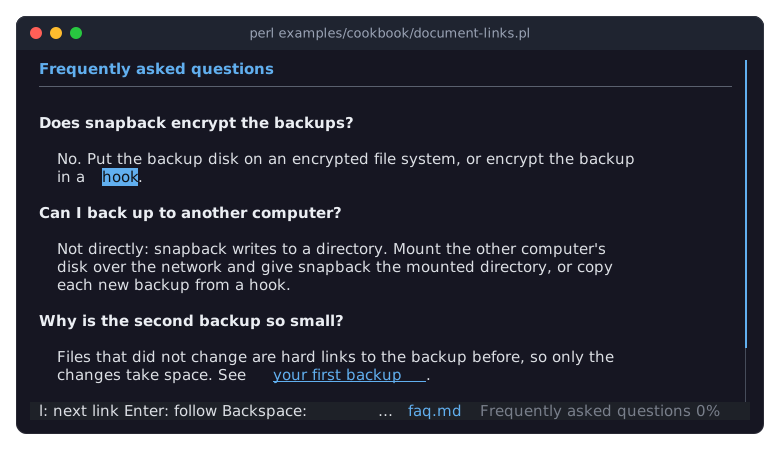
The picture shows the FAQ, opened with the fifth link of the manual, after l selected its first link.
The user selects links with
l(the next link) andL(the previous one). Selection starts at the first link in view, and the view scrolls as little as possible to keep the selected link visible.Enterfollows the selected link, and so does a click on any link.Following a link fires LinkActivate: the text of the link fires it, and it bubbles through the view to the handler.
$event->linkis the target of the link, exactly as the reader made it. What a target means is up to the program. A Markdown target cannot contain a space, so the pages write%20for one; this program decodes that, then splits the target at#into a file name and a section name.find_section turns a section name into the index of the item to show. It compares the name in four rounds: exactly, ignoring case, as the start of a title or anchor (followed by a non-word character), and that again ignoring case. Within each round the section titles come before the anchors, the texts of the terms. It returns
undefwhen nothing matches, which the program reports instead of jumping.show_item scrolls the item to the top of the view in the next frame. document replaces the document; the view then starts at the top, without a selected link or a search. The program keeps the parsed documents in
%document_of, so going back does not parse a file again.The history stores the page and top_item, the index of the item at the top of the view. Going back shows that item at the top again, which restores the position closely enough for a help browser.
After every frame that shows something new, the view fires ViewChange. The program keeps the title of the current section and the percentage in
$where, and the status bar shows it on the right.Backspaceis not a key of the view, so the view lets it pass, and it reaches the handler on the root box. The same is true for every key the view does not use.
Search a document and show the reader's position (search, ViewChange)
Goal: search like less. / moves to a search field, Enter there searches and returns to the document, n and N step through the matches, Escape ends the search. A line at the bottom shows the current match, the section and how far down the reader is.
This program is shipped as examples/cookbook/document-search.pl.
use v5.32;
use warnings;
use feature 'signatures';
no warnings 'experimental::signatures';

use FindBin;
use lib "$FindBin::Bin/lib";    # where My/Markdown.pm lives

use Clay::UI::Enum::Result;
use Clay::XS qw(sizing_grow sizing_fixed CLAY_LEFT_TO_RIGHT CLAY_TOP_TO_BOTTOM CLAY_TEXT_WRAP_NONE);
use My::Markdown;
use Term::Fabulous;
use Term::Fabulous::Widget::Box;
use Term::Fabulous::Widget::DocumentView;
use Term::Fabulous::Widget::Text;
use Term::Fabulous::Widget::TextField;

my $view = Term::Fabulous::Widget::DocumentView->new(
	id       => 'manual',
	document => My::Markdown->parse_file("$FindBin::Bin/documents/snapback.md"),
	layout   => { sizing => { width => sizing_grow(), height => sizing_grow() }, padding => { left => 1, right => 1 } },
);

# The bottom line: a search field on the left, the position on the right.
my $field = Term::Fabulous::Widget::TextField->new(
	placeholder => '/ to search',
	layout      => { sizing => { width => sizing_fixed(24) } },
);
my $position = Term::Fabulous::Widget::Text->new( text => '', wrap_mode => CLAY_TEXT_WRAP_NONE, text_color => [ 150, 160, 180, 255 ] );
my $line     = Term::Fabulous::Widget::Box->new(
	layout => { layout_direction => CLAY_LEFT_TO_RIGHT, sizing => { width => sizing_grow() }, padding => { left => 1, right => 1 }, child_gap => 2 },
);
$line->add_child( $field, $position );

my $root = Term::Fabulous::Widget::Box->new( layout => { layout_direction => CLAY_TOP_TO_BOTTOM, sizing => { width => sizing_grow(), height => sizing_grow() } } );
$root->add_child( $view, $line );

my $ui = Term::Fabulous->new( root => $root, width => 80, height => 24 );

# / moves to the search field, Enter there searches and returns to the
# document, where n and N step through the matches and Escape ends the
# search.
$view->on(
	KeyPress => sub ($event) {
		return Clay::UI::Enum::Result->CONTINUE unless ( $event->key_name // '' ) eq '/';
		$ui->interaction->set_focused_widget($field);
		return;
	}
);
$field->on(
	KeyPress => sub ($event) {
		return Clay::UI::Enum::Result->CONTINUE unless ( $event->key_name // '' ) eq 'Escape';
		$ui->interaction->set_focused_widget($view);
		return;
	}
);
$field->on(
	Submit => sub ($event) {
		$view->search( $event->value );
		$ui->interaction->set_focused_widget($view);
		return;
	}
);

# After every frame that shows something new, the view says what it
# shows: the section at the top, how far down the reader is, and the
# search.
$view->on(
	ViewChange => sub ($event) {
		my $search
			= !defined $event->query ? ''
			: $event->matches        ? sprintf( 'match %d of %d  ', $event->match, $event->matches )
			:                          sprintf( 'no "%s"  ', $event->query );
		$position->text( sprintf '%s%s  %d%%', $search, $event->section_title // 'top', $event->percent );
		return;
	}
);

$ui->interaction->set_focused_widget($view);
$ui->run;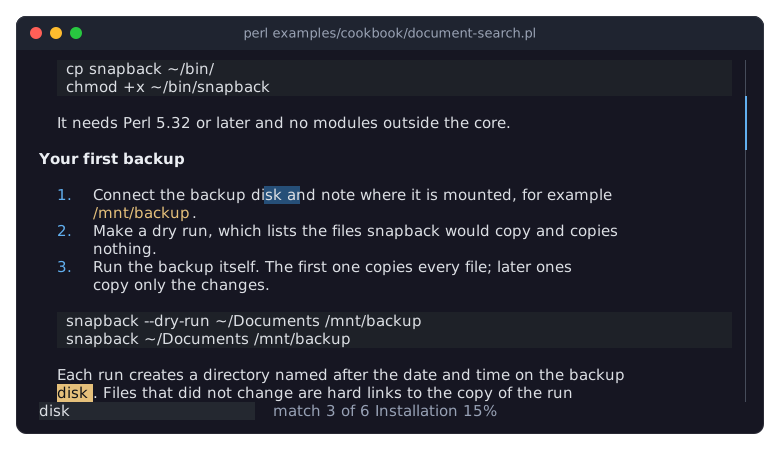
The picture shows the manual after searching for disk and pressing n twice.
search highlights every occurrence of the text in every item, the cells of a table included, and makes the first one at or below the top of the view the current match, which has a color of its own. The view scrolls the current match into view and returns the number of matches. The search ignores case unless the text contains a capital letter (
diskfindsDisk,Diskdoes not finddisk), and the text is plain text, not a regular expression.nandNmove to the next and previous match, wrapping around at the ends.Escapeends the search and also drops a selected link. All three are keys of the view; the program does not handle them. Program code can do the same with next_match, previous_match and clear_marks.The
ViewChangeevent carries everything a status line needs, so the program never has to ask the view:section_title(undefabove the first heading),percent(0 at the top, 100 at the end, and 100 for a document that fits),query,matchesandmatch, the number of the current match from 1. A search can find nothing; thenqueryis set andmatchesis 0.The view knows what a frame shows only after the frame was drawn, so
ViewChangecomes right after the frame it describes. Changes made in the handler, such as the new text of$position, appear in the next frame, which Term::Fabulous draws at once./is not a key of the view, so it reaches the handler that the program registered on the view. The handler moves the focus to the TextField, whoseSubmitevent starts the search. AnEscapein the field returns the focus to the view without searching.
SEE ALSO
This page is part of Term::Fabulous::Cookbook. Previous page: Term::Fabulous::Cookbook::Canvases. Next page: Term::Fabulous::Cookbook::DocumentTechniques.
Term::Fabulous::Cookbook::DocumentTechniques (the recipes that continue these), Term::Fabulous::Widget::DocumentView, Term::Fabulous::Document, Term::Fabulous::Event::LinkActivate, Term::Fabulous::Event::ViewChange, "Documents" in Term::Fabulous::Manual::Layout.