NAME
Term::Fabulous::Widget::CodeBlock - Unwrapped code on its own background, clipped and scrolled sideways
SYNOPSIS
use Term::Fabulous::Widget::CodeBlock;

my $code = Term::Fabulous::Widget::CodeBlock->new(
	code     => "my \$x = 1;\nsay \$x;",
	language => 'perl',
);

# Style the keyword "my" (characters 0 to 2):
$code->spans( [ [ 0, 2, 'bold #c678dd' ] ] );

# Syntax highlighting: a function that turns the code into spans.
$code->highlighter( sub ( $text, $language ) { return [ my_highlighter( $text, $language ) ] } );

# Show the code eight columns further right: the lines move left.
$code->offset(8);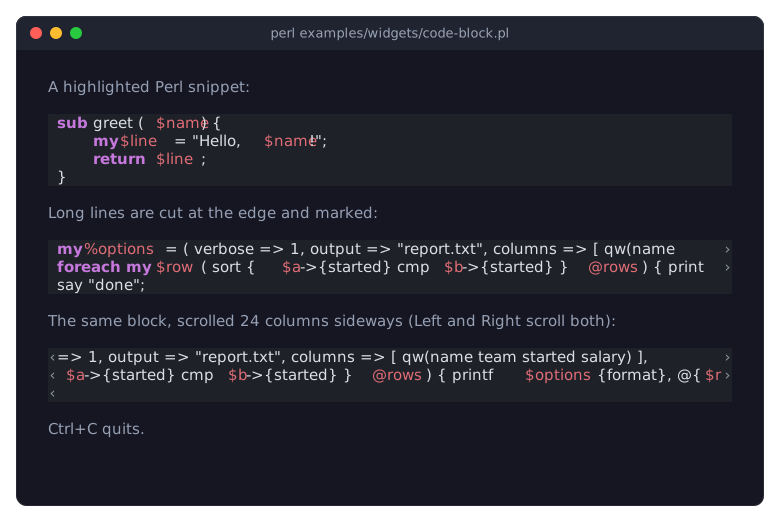
The program is examples/widgets/code-block.pl.
DESCRIPTION
A code block shows lines of code, such as a verbatim paragraph of a document. The lines never wrap, and the block draws them on a background of their own that sets them apart from the surrounding prose. The code factory of a document makes one, and a program can also use the widget on its own.
The block is a Term::Fabulous::Widget::Display, a widget that paints its cells itself (see "A widget that draws itself" in Term::Fabulous::Manual::CustomWidgets), for two reasons:
Code must not wrap, and a line that is wider than the block must end at the block's edge instead of running into the border of the surrounding view. A Display paints only its own cells, so nothing it draws can spill outside. A clipped line shows a mark in the margin:
›on the right where the line continues beyond the right edge, and‹on the left of every non-empty line while the code is scrolled sideways. A wide character that an edge would cut in half is left out.Every character can have a style of its own, from the highlighter and from the program's spans, and Clay does not have to lay out the text.
The block is as many rows tall as its code has lines, and as wide as its parent allows (natural_size requests sizing_grow for the width). One column on each side is a margin, where the clip marks appear. The colors are the code_block and clipped styles of the block's "look_class", Term::Fabulous::Document::Look or a subclass of it, in the theme the block draws with.
The block shows its code shifted to the left by "offset" columns. It does not react to keys or the mouse itself: the widget that contains it decides when to scroll, so that several blocks can move together. Term::Fabulous::Widget::DocumentView, for example, scrolls all its code blocks sideways together with the Left and Right keys and the horizontal mouse wheel.
CONSTRUCTOR
new
my $code = Term::Fabulous::Widget::CodeBlock->new( code => $text, %parameters );Creates a code block. It takes all parameters of Term::Fabulous::Widget::Display (id, layout and so on), plus the following. Unknown parameters die, and so do invalid values, with a message that names the parameter.
code-
The code, a string, with lines separated by
"\n". Default: the empty string. Expand tabs before passing the code: the block shows each tab as a single space. language-
undef(the default) or a non-empty string that names the language of the code, such asperl. The block does not use it except to pass it to thehighlighter. highlighter-
undef(the default) or a code reference that computes the syntax highlighting. The block calls it as$highlighter->( $code, $language )the first time it paints after the code, the language or the highlighter changed, and keeps the result until one of them changes again.The highlighter returns an array reference of spans
[ $start, $end, $style ].$startand$endare character offsets into the code ($endis the offset after the last character of the span), and$styleis a style string or style hash of Term::Fabulous::Text::Style, such as'bold #c678dd'. This is the same format as the spans of a Term::Fabulous::Widget::Text. A result in any other format, or a span that does not lie within the code, dies when the block is painted. See "SYNTAX HIGHLIGHTING". spans-
An array reference of spans in the same format, for styles that come from the program rather than from the language, such as search matches. They are applied on top of the highlighter's spans: where both style a character, the program's span overrides the colors and style bits it sets, so a search match stays visible in highlighted code. Default: no spans.
offset-
A non-negative integer, default 0: the number of columns by which the code is scrolled to the left. The block keeps the value as given, but paints with at most the offset that brings the end of its widest line into view (see "shown_offset").
look_class-
The name of the Term::Fabulous::Document::Look class whose
code_blockandclippedstyles the block paints with; defaultTerm::Fabulous::Document::Look. The code factory of a document passes the document's look, so a look subclass that restyles code applies to the code blocks of the document too. A value that is not the name of a loaded subclass of the look dies.
METHODS
The block has all methods of Term::Fabulous::Widget::Display, plus the following. text_marks and marks_changed are the methods Term::Fabulous::Role::MarkedText requires; programs do not call them. The accessors of the parameters return the current value when called without an argument. With an argument, they check the new value as "new" does (an invalid value dies), set it, and return it; the change shows in the next frame.
code
$code->code("print 42;\n");Gets or sets the code. Setting it also removes the program's spans ("spans") and the highlights ("highlights"), because their offsets refer to the old code, and makes the highlighter run again at the next paint.
language
$code->language('perl');Gets or sets the language. Setting it makes the highlighter run again at the next paint.
highlighter
$code->highlighter( \&highlight );Gets or sets the highlighter. Setting it discards the stored result of the previous highlighter; the new one runs at the next paint.
spans
my $spans = $code->spans;    # [ [ 0, 2, { set => ..., clear => ..., color => ..., background => ... } ], ... ]
$code->spans( [ [ 0, 2, 'bold' ] ] );
Gets or sets the program's spans. Both the getter and the setter return a copy of the spans, in which each style is normalized to a style hash of Term::Fabulous::Text::Style. Setting the spans does not run the highlighter again and counts as a change of the content (see "content_revision"). Invalid ranges or styles die (see "set_spans" in Term::Fabulous::Text::Marks). The spans and highlights methods are those of a Term::Fabulous::Widget::Text (both from Term::Fabulous::Role::MarkedText).
stylize
$code->stylize( 'bold', 0, 2 );
$code->stylize('dim');    # the whole code
Adds a span after the existing ones, so it wins where they overlap. $start defaults to 0, $end to the length of the code. Returns the widget.
clear_spans
$code->clear_spans;Drops every span of the program; the highlighter's stay. Returns the widget.
highlights
$code->highlights( [ [ 12, 18, 'on selection' ] ] );
my $highlights = $code->highlights;
Accessor for the highlights: ranges [ $start, $end, $style ] like "spans", painted over the highlighter's spans and the program's, and kept apart from them: what a search marks in the code. Setting replaces every highlight and leaves "content_revision" alone. The reader returns a copy with normalized styles. Invalid ranges or styles die. A color in a style may be a palette token of the theme, which the code block looks up when it paints.
clear_highlights
$code->clear_highlights;Drops every highlight. Returns the widget.
content_revision
my $revision = $code->content_revision;A counter that grows whenever the code or the program's spans change, for callers that recorded offsets into it. Highlights leave it alone.
search_texts, search_revision, highlight_text, clear_text_highlights, reveal_text
The methods of Term::Fabulous::Role::Searchable, which a code block does for its code (through Term::Fabulous::Role::MarkedText): search_texts returns one entry, [ undef, $code ], search_revision is "content_revision", highlight_text sets "highlights", clear_text_highlights clears them, and reveal_text returns the widget itself and the line of the offset, since code never wraps.
offset
$code->offset(8);Gets or sets the offset, in columns. The block repaints only when the change affects what it shows, that is, when "shown_offset" changes.
look_class
$code->look_class('My::Look');Gets or sets the name of the look class (see "new"). Setting it repaints the block in the styles of the new class.
shown_offset
my $columns = $code->shown_offset;Returns the offset the block paints with: "offset", but no more than "max_offset".
max_offset
my $columns = $code->max_offset;Returns how many columns the code can be scrolled: the width of its widest line minus the number of columns the block showed of it in the last frame (its width less the two margin columns), or 0 if every line fits. Before the first frame, when the block has no width yet, this is the width of the widest line.
line_count
my $lines = $code->line_count;Returns the number of lines of the code, which is at least 1: empty code counts as one empty line, and a trailing "\n" adds an empty last line.
widest_line_columns
my $columns = $code->widest_line_columns;Returns the width of the widest line, in terminal columns; a wide character, such as a CJK character, counts as two.
SYNTAX HIGHLIGHTING
The block knows no programming language. A highlighter is any function that maps the code and a language name to spans, so syntax highlighting is supplied from outside. Pass the highlighter to the highlighter parameter of "new" in Term::Fabulous::Widget::DocumentView, which hands it to every code block of the view, or set it on a single block. A highlighter that does not know the language returns an empty array reference, [].
A highlighter for Perl could use PPI to find the tokens and give each kind of token a style. The following one only marks a few Perl keywords:
my $highlighter = sub ( $code, $language ) {
	return [] unless defined $language && $language eq 'perl';
	my @spans;
	while ( $code =~ /\b(?:my|our|sub|return|if|elsif|else|unless|foreach|while)\b/g ) {
		push @spans, [ $-[0], $+[0], 'bold #c678dd' ];
	}
	return \@spans;
};

$code->highlighter($highlighter);
"Highlight the syntax of code blocks (highlighter, CodeBlock)" in Term::Fabulous::Cookbook::DocumentTechniques is a recipe that adds syntax highlighting to a document view and scrolls its code blocks sideways.
KDL PROPERTIES
The block accepts the properties of "KDL PROPERTIES" in Term::Fabulous::Widget::Box, plus code, language, offset and look_class:
use Term::Fabulous::Widget::CodeBlock as CodeBlock

CodeBlock "example" {
	code "my $x = 1;\nsay $x;"
	language "perl"
}
SEE ALSO
Term::Fabulous::Cookbook::DocumentTechniques, Term::Fabulous::Document, Term::Fabulous::Widget::DocumentView, Term::Fabulous::Widget::Display, Term::Fabulous::Text::Style.