NAME
Term::Fabulous::Widget::Table::Borders - Work out the grid lines of a table
SYNOPSIS
use Term::Fabulous::Widget::Table::Borders qw(resolve_borders);
use Term::Fabulous::Enum::BorderStyle;
my $Solid = Term::Fabulous::Enum::BorderStyle->Solid;

my $resolved = resolve_borders(
	columns => 2,
	header  => 1,
	table   => { map( { $_ => $Solid } qw(border_top border_right border_bottom border_left column_lines) ) },
	lines   => [ {}, {}, { spanning => 1 }, {} ],
);
my $first = $resolved->{lines}[0][0];    # { sides => { top, left }, corners => { top_left => "\x{250C}" } }
DESCRIPTION
Term::Fabulous::Widget::Table draws its lines with the borders of its cells: every line between two cells is drawn by exactly one of them, and the corners where lines meet get the junction glyphs of "junction" in Term::Fabulous::Enum::BorderStyle. This module decides, from the styles of the table, its columns, its lines (rows) and its cells, which cell draws which side in which style and which glyph each drawn corner gets. It has no widgets; the table applies the result. You do not need it unless you draw a grid of your own; the lines of a table are explained in "Lines between and around the cells" in Term::Fabulous::Manual::TableStyles.
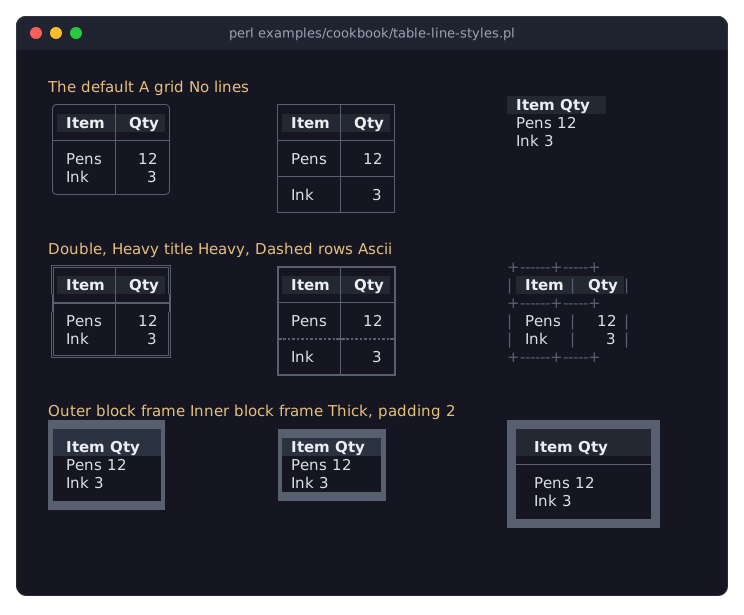
Where a line is, and in which style
Every segment of a grid line (between two cells, or between a cell and the outside) gets the first style named, from the most specific level to the least: the cells on both sides (border_*), the rows (border_*, and column_lines between the cells of a row), the columns (border_left, border_right, and row_lines between the cells of a column), the table (border_*, column_lines, row_lines, header_line below the header). Within a level, the cell (or row) below or to the right wins. The style Hidden ('none' in a style hash) means "no line" and ends the search.
A grid line exists when any of its segments has a style. Where it exists but a segment has none, the cell still takes the cell of space and draws it blank, so the contents of every row and column stay aligned. Spanning lines (group headers) have only their outer vertical segments.
Who draws it
The cell to the right of a vertical segment draws it as its left side; the last column also draws the right edge. The line below a horizontal segment draws it as its top side, except: the last line draws the bottom edge, the header draws the line below it (the body scrolls under the header), and a non-spanning line draws the line below it when the next line spans the columns, so that the junctions of its columns are part of its own corners.
A ledge is a line that holds nothing and draws only an edge of the frame: the table's footer, which draws the bottom edge below the scrolling rows, and its top without column titles. A ledge is the first or the last line (any other dies), and there is no line between it and its neighbour, whatever the styles say.
The scrollbar column
With gutter, a column for the scrollbar follows the last grid column. The cells of the last column then draw no right side: the frame's right side, in the table's border_right, is drawn by three strips beside the header lines, the body and the last line, which the result returns under gutter. The horizontal lines that reach the frame run on beside the strips: the header strip draws the top edge and the line below the header lines, the footer strip the bottom edge, each with the corner or junction where it meets the right side. Lines between rows end at the last cell.
A frame in a block style
A frame side in a style without joint glyphs (Outer, Inner, Thick, ...) does not join: where an inner line meets it, the frame runs on with its straight edge glyph and the inner line ends there; at the table's four corners, the frame keeps the corner glyphs of its style (the corner is not in corners, so the side's style draws it). Such a side is listed in outer only when its style draws that side on the background outside the box (glyph location 1 or 2, as Inner), so that the cells' colors reach the glyphs of Outer and Thick. Frame sides in line styles are always in outer.
FUNCTIONS
resolve_borders
my $resolved = resolve_borders(%arguments);
my $cells    = $resolved->{lines};
my $strips   = $resolved->{gutter};
Arguments: columns (the number of grid columns), header (how many of the lines are header lines, default 0), gutter (whether the scrollbar column follows the last grid column, default 0), table, column_styles (one hash per column) and lines (one hash per line, header lines first, each with spanning, ledge, style and cells, one hash per cell or one for a spanning line), with the keys named above. Every hash and key is optional; styles are Term::Fabulous::Enum::BorderStyle items.
Returns a hash reference. lines is an array reference with one entry per line, an array reference with one hash per cell: sides maps each side the cell draws (top, right, bottom, left) to its style (Blank for a segment without a line on a line that exists), corners maps each corner the cell draws (top_left, top_right, bottom_left, bottom_right; a corner is drawn where two drawn sides meet) to its glyph (a space where no line passes; a corner of a block-style frame is left out, see "A frame in a block style"), and outer lists the drawn sides of the outer frame of the table that are drawn on the background outside it (for "outer_border_sides" in Term::Fabulous::Role::HasBorderStyle). gutter is undef without the gutter argument; with it, a hash with the keys header, body and footer, one for each strip of the scrollbar column (see "The scrollbar column"), each a hash like a cell's (sides, corners, outer).
SEE ALSO
"STYLES AND BORDERS" in Term::Fabulous::Manual::TableStyles, "Lines of columns, rows and cells" in Term::Fabulous::Manual::TableStyles, "junction" in Term::Fabulous::Enum::BorderStyle.