NAME
Term::Fabulous::Widget::Dialog - A box that opens over the whole screen, keeps the focus and answers
SYNOPSIS
use Term::Fabulous::Widget::Dialog;
use Term::Fabulous::Widget::Button;
use Term::Fabulous::Widget::Text;
use Clay::XS qw(sizing_fixed);

my $dialog = Term::Fabulous::Widget::Dialog->new(
	id     => 'confirm',
	layout => { sizing => { width => sizing_fixed(40) } },
);
my $quit = Term::Fabulous::Widget::Button->new( background_color => [ 40, 60, 90, 255 ], layout => { padding => { left => 1, right => 1 } } );
$quit->add_child( Term::Fabulous::Widget::Text->new( text => 'Quit', text_color => [ 255, 255, 255, 255 ] ) );
$dialog->add_child(
	Term::Fabulous::Widget::Text->new( text => 'Really quit? Escape cancels.', text_color => [ 220, 220, 220, 255 ] ),
	$quit,
);
$quit->on( Activate => sub ($event) { $ui->loop->stop; return } );
$dialog->on( Close => sub ($event) { $status->text('cancelled'); return } );

# From a key binding or a button:
$dialog->open($ui);

# A dialog with its own title, buttons and notice line:
my $export = Term::Fabulous::Widget::Dialog->new(
	title   => 'Export the table',
	buttons => [ { id => 'export', label => 'Export', primary => 1 }, { id => 'cancel', label => 'Cancel' } ],
);
$export->add_child( Term::Fabulous::Widget::Text->new( text => 'All 120 rows go to export.csv.' ) );
$export->on( Answer => sub ($event) {
	export_csv() if $event->button eq 'export';    # Escape answers cancel, dismissed
	return;
} );
$export->open($ui);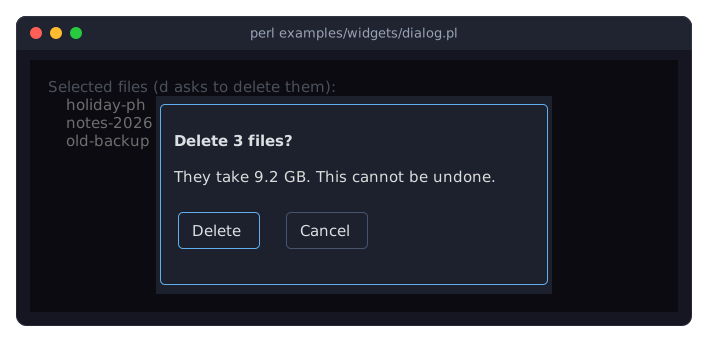
The program is examples/widgets/dialog.pl.
DESCRIPTION
A Dialog is a Term::Fabulous::Widget::Box that is not part of the layout until it is opened. "open" puts it in the center of the screen (or at its right edge, see placement), on top of everything else, behind a translucent backdrop that dims the rest of the screen, and gives the keyboard focus to the first widget inside it. While it is open:
Tab and Shift+Tab cycle through the widgets inside the dialog only;
mouse clicks outside the dialog reach nothing behind it, whatever the
backdrop_color: they move the focus onto the backdrop, from where Tab goes to the first widget of the dialog and Shift+Tab to the last, and theirMouseevents are fired on the backdrop, from where they bubble to the root widget (the backdrop's parent), not to the widgets behind the dialog;key presses go to the focused widget inside the dialog and bubble up through the dialog to the backdrop, where
Escapecloses the dialog (unlessclose_on_escapeis off). They go no further: the widgets and key bindings behind the dialog do not see them. Ctrl+C still ends the program (unless the UI was made withstop_on_ctrl_c => 0), Tab and Shift+Tab still move the focus;the focus stays inside the dialog: when the focused widget is disabled or removed, its nearest ancestor that can take the focus does, which is the backdrop unless a widget inside the dialog is closer, and when the program focuses nothing the backdrop takes it (an
OnBlurlistener inside the dialog must let the event bubble for that, see Term::Fabulous::Widget::Dialog::Backdrop);the widgets behind the dialog stay visible through the backdrop, but are neither hovered nor pressed.
"close" takes the dialog off the screen, puts the focus back on the widget that had it before (if that widget can still take the focus), and fires Close (Term::Fabulous::Event::Close) and then Answer ("Answers") on the dialog. A closed dialog can be opened again, as often as needed, and keeps its children and their state in between.
Title, buttons and the notice line
A dialog can bring the parts most dialogs have. A title is a bold line at the top. buttons are one row of bordered buttons at the bottom; pressing one makes the dialog "answer" with the button's id. The notice line above the buttons says something with "notice", for example what is wrong with an input. The children the program adds go between the title and the notice line: the dialog puts its parts in their places when it opens (see "place_parts").
Answers
Every time a dialog closes, it fires two events on itself: Close, then Answer. An answer through "answer" (a button, or the program) names its button and carries the dialog's "values" and the values given. A dialog closed without an answer (Escape, or "close" from the program) is dismissed: it answers with the button cancel and the dialog's "values", and the event's dismissed is true. That is one rule for every dialog: Term::Fabulous::Widget::Prompt reports its fields as its values, and Term::Fabulous::Widget::FileDialog (its choice answers with the path), Term::Fabulous::Widget::KeyReference (its Close button answers close) and a plain dialog have none. When the listeners run, the dialog is closed and the focus is back where it was.
A Dialog comes with a look from the theme's dialog family (a dark background and a round border in the accent blue in the built-in dark theme), one cell of padding and a vertical layout with a gap of one row between the children. Every one of these is an ordinary Box parameter and can be overridden. Give the dialog a width (sizing in layout); without one it is as wide as its widest child.
CONSTRUCTOR
new
my $dialog = Term::Fabulous::Widget::Dialog->new(%parameters);All parameters are optional; unknown parameters die. A Dialog takes every parameter of Term::Fabulous::Widget::Box (see "new" in Term::Fabulous::Widget), with the defaults described above, plus:
backdrop_color-
The color of the layer behind the dialog, in any format Term::Fabulous::Color accepts. Default: the theme's
dialog.backdrop,[ 0, 0, 0, 128 ]in the dark theme, black at half opacity, which dims the screen behind the dialog. An opaque color hides it; alpha 0 leaves it as it is. z_index-
An integer from -32768 to 32767; other values die. Dialogs and other floating widgets with a higher value are drawn over those with a lower one. Default: 1000. Popups (the open list of a Term::Fabulous::Widget::Dropdown, a popup Term::Fabulous::Widget::Menu, a table's column chooser) float at "TOPMOST_Z_INDEX" in Term::Fabulous::Placement, so they are drawn over the dialog they are in.
close_on_escape-
A boolean. Default: 1:
Escape, pressed while the focus is inside the dialog, closes it. With 0 the program closes the dialog itself. title-
A character string, drawn in bold on the first row. Default:
'', no title. -
An array reference of buttons, each a hash reference with an
id(a string, required, unique), alabel(a string, required) andprimary(a boolean, default 0). They are drawn in one row at the bottom, in the order given, from the left, each bordered with a column of padding on either side; primary buttons get the classprimary, which a theme may give a look of its own (see "Variants and classes" in Term::Fabulous::Manual::Looks). Pressing one calls "press_button", which answers with its id. Unknown keys die. Default:[], no buttons. notice_line-
When the notice line above the buttons takes room:
shown(the default), only while it says something;kept, always in its place, without rows while it says nothing (the gap above it stays);row, always at least one row high, so that a notice does not change the height of the dialog. Anything else dies. placement-
center(the default): the dialog sits in the middle of the screen.right: it floats at the right edge of the screen, a column from it, centered from top to bottom, just above its backdrop'sz_index. Anything else dies.
METHODS
A Dialog has all methods of Term::Fabulous::Widget plus these:
open
$dialog->open($ui);Opens the dialog in the Term::Fabulous object $ui: adds it to the screen as described above and focuses the first focusable widget inside it (the backdrop when there is none). Opening an open dialog does nothing. Dies when $ui is not a Term::Fabulous (or other Clay::UI) object, and when the dialog has been added to another widget as a child. Returns the dialog.
close
$dialog->close;Dismisses the dialog: removes it from the screen, gives the focus back to the widget that had it when the dialog opened (if that widget still exists and can take the focus; the backdrop names it as its focus heir, see "focus_heir" in Term::Fabulous::Widget::Dialog::Backdrop) and fires Close and Answer (cancel, dismissed) on the dialog. Closing a closed dialog does nothing. A dialog whose backdrop the program took out of the tree itself (with clear_children on the root, for example) is still open until close is called; the focus went back when the backdrop left, and close then only fires Close and Answer. Returns the dialog.
answer
$dialog->answer('export');
$dialog->answer( save => path => $path );
Closes the dialog and fires Close and then Answer with this button id, the dialog's "values" and the values given (which win over them), not dismissed (see "Answers"). A dialog with buttons dies for an id that is none of them; one without buttons answers with any string. Dies when the dialog is not open. Returns the dialog.
press_button
$dialog->press_button('export');What pressing a button does. In a Dialog, it answers with the button's id. A subclass whose buttons do more first (check the inputs, choose a file) overrides it. Returns the dialog.
values
my $values = $dialog->values;What every answer of the dialog carries, as a new hash reference: an empty hash in a Dialog. A subclass with inputs reports them (see "values" in Term::Fabulous::Widget::Prompt).
notice
$dialog->notice( 'The name is taken.', 'error' );
$dialog->notice('Saved [bold]notes.txt[/].');
$dialog->notice('');    # says nothing
my $markup = $dialog->notice;
Says something in the notice line above the buttons, in the rich markup of Term::Fabulous::Text::Markup (escape text of the user with escape_markup). The kind is info (the default, the text color) or error (the color of an invalid input, the theme's input.text.invalid); anything else dies. An empty markup says nothing. The line wraps at the width of the dialog; when it takes room depends on notice_line. Returns the dialog. Without arguments, returns the markup shown, or undef while the line says nothing.
notice_text
my $text = $dialog->notice_text;What the notice line says, as plain text without the markup, or undef while it says nothing.
title
$dialog->title('Export 3 tables');Accessor for the title. Writing it changes the title line at once; an empty string takes it away.
button, button_ids, is_primary, default_button
$dialog->button('export')->disabled(1);
my @ids     = $dialog->button_ids;
my $checks  = $dialog->is_primary('export');
my $default = $dialog->default_button;
The Term::Fabulous::Widget::Button of a button (dying for an id the dialog has no button of), the ids of the buttons in order, whether a button is primary (1 or 0), and the button that a subclass presses for Enter in a field: the first primary button, the first button when none is, or undef without buttons.
notice_line, placement
$dialog->placement('right');Accessors for the parameters of the same names.
is_open
if ( $dialog->is_open ) { ... }1 while the dialog is open, 0 otherwise.
backdrop
my $backdrop = $dialog->backdrop;The Term::Fabulous::Widget::Dialog::Backdrop behind the open dialog, or undef while it is closed or after the program took it out of the tree. Rarely needed.
backdrop_color, z_index, close_on_escape
$dialog->backdrop_color( [ 0, 0, 0, 200 ] );
$dialog->z_index(2000);
$dialog->close_on_escape(0);
Accessors for the constructor parameters of the same names. Without an argument they return the current value; with one they set it and return the stored form. Changes to backdrop_color and z_index show on an open dialog with the next frame.
SUBCLASS INTERFACE
place_parts
$self->place_parts;Puts the parts of the dialog in their places: the title first, the notice line (when notice_line says it takes room) and the button row last. "open" calls it, so children added before then end up between them. A subclass that rebuilds its children while the dialog is open calls it afterwards. A button row the subclass put inside one of its own boxes stays there. Returns the dialog.
button_row
$search_row->add_child( $search, $self->button_row );The box with the buttons, or undef without buttons. A subclass may put it somewhere else in the dialog (Term::Fabulous::Widget::KeyReference puts it next to its search field on a short screen).
EVENTS
Besides the events of every Box ("EVENTS" in Term::Fabulous::Widget::Box), a Dialog fires:
Close(Term::Fabulous::Event::Close)-
The dialog was closed: by an answer, by
Escapeor by "close". Fired on the dialog after it has left the screen, so it does not bubble anywhere. Answer(Term::Fabulous::Event::Answer)-
Right after
Close, every time: the button that answered and the values, orcancelas dismissed (see "Answers").
Events from the widgets inside the dialog (Activate of a Button, Submit of a text field, Change, ...) bubble through the dialog as usual, so one listener on the dialog can handle them all. The Activate of the dialog's own buttons stops at the button, which calls "press_button".
KDL PROPERTIES
The properties of "KDL PROPERTIES" in Term::Fabulous::Widget::Box, plus backdrop_color (a color string), z_index (an integer from -32768 to 32767), close_on_escape (#true or #false), title, notice_line and placement (strings). buttons is not a KDL property: a dialog from a layout file has no buttons of its own; give it Button children or build it in Perl.
A Dialog is added to the widget tree only when it opens, and a Dialog that is a child of another widget cannot open. A layout file has only one top-level widget, so a Dialog must be the root widget of a layout file of its own. build returns the dialog, which is not open yet. With this in about.kdl:
use Term::Fabulous::Widget::Dialog as Dialog
use Term::Fabulous::Widget::Text as Text

Dialog "about" {
	sizing width="fixed(40)"
	backdrop_color "rgba(0, 0, 0, 0.7)"
	Text { text "Term::Fabulous"; text_color "#ffffff"; }
}
open the dialog from Perl:
my $about = Term::Fabulous::Layout->new( file => 'about.kdl' )->build;
$about->open($ui);
SEE ALSO
Term::Fabulous::Widget::Box, Term::Fabulous::Event::Close, Term::Fabulous::Event::Answer, Term::Fabulous::Widget::Dialog::Backdrop, Term::Fabulous::Widget::Prompt, Term::Fabulous::Widget::FileDialog, Term::Fabulous::Widget::KeyReference, "FOCUS" in Term::Fabulous::Manual::Events, "floating" in Term::Fabulous::Widget, "A dialog of your own" in Term::Fabulous::Manual::CustomWidgets, "Ask a question in a dialog (Dialog widget)" in Term::Fabulous::Cookbook::Forms, "A login form (centered dialog, masked password)" in Term::Fabulous::Cookbook::Forms, "Confirm before quitting (Prompt)" in Term::Fabulous::Cookbook::Forms, "Open and save a file (FileDialog)" in Term::Fabulous::Cookbook::Forms, "Show the keys in a help screen (KeyReference)" in Term::Fabulous::Cookbook::Menus.